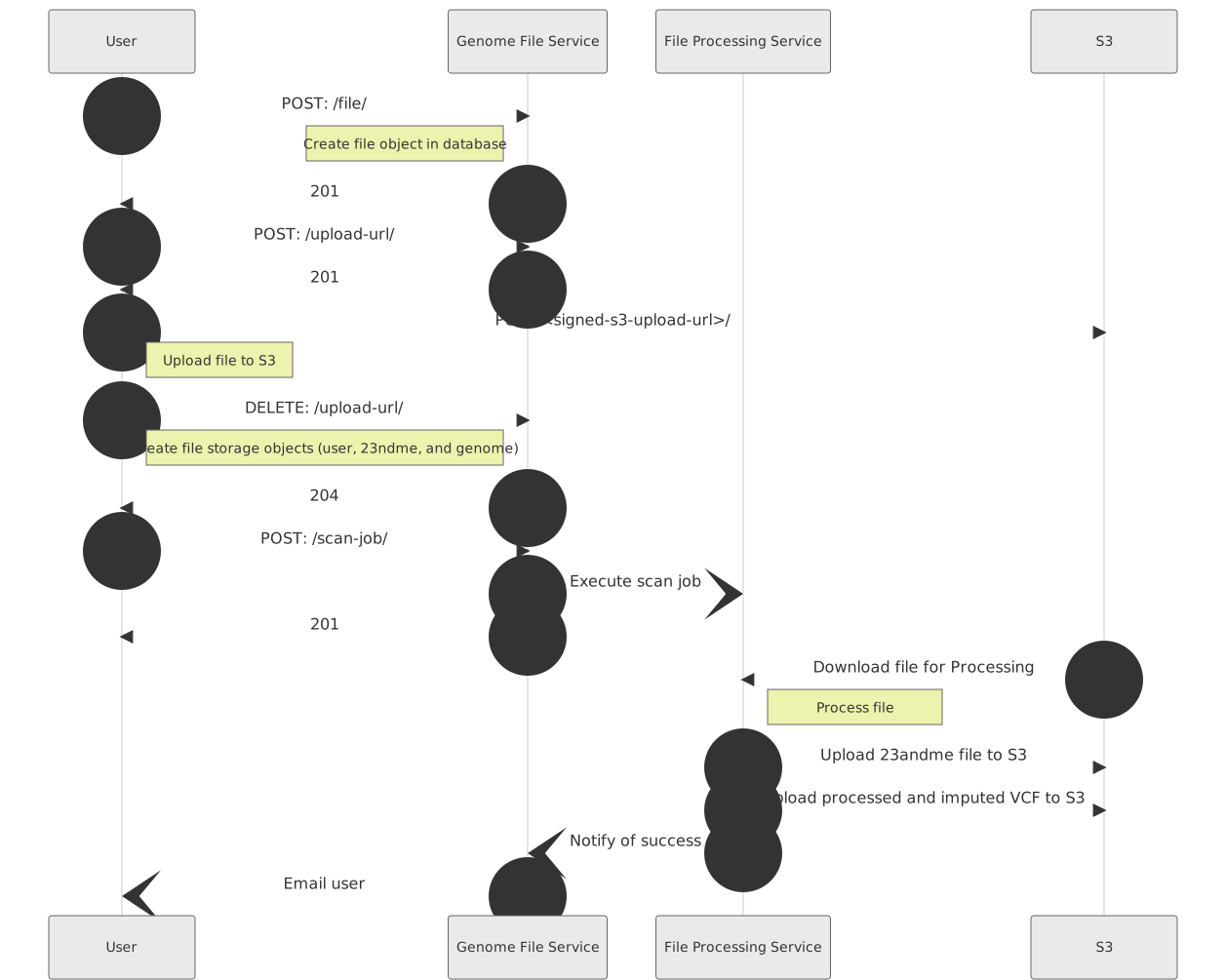
Basic Usage
There are 5 steps to process a file:
- Create a genome file using the profile id (POST
/file/ - Create a pre-signed URL using the genome file id (POST
/upload-url/) - Upload the file to the pre-signed URL
- Notify the service the upload is complete (DELETE
/upload-url/:id/) - Start a scan job to process the file (POST
/file/:id/scan/)
Genome Files
Endpoints:
/file//file-processing-service/version/
Most tasks use the /file/ endpoint:
-
POSTcreates a genome file for a given profile (step 1)-
Payload:
profile id(required)upload_provider(optional)
-
Response:
idfield will be used for all other endpoints
-
-
GETreturns a list of all genome files associated with the user’s account- No request payload
-
GETdescribe a specific genome file- Path:
/file/{genome-file-id}/
- Path:
-
GETdownload the genome file- Path:
/file/{genome-file-id}/download/
- Path:
The second endpoint returns the current file-processing version.
Uploads
There are 3 endpoints for uploads:
/upload-url//upload-raw-reads//bulk-upload/
Most users will only use the /upload-url/ endpoint. The /upload-raw-reads/ endpoint is only used for large file pairs containing raw sequencing data.
The /bulk-upload/ endpoint is used for uploading an archive containing multiple genome files and a file manifest linking each genome file to a profile or sample id.
In general, the endpoints are used the same way:
-
POSTcreate pre-signed URLs for uploading files (step 2)-
Request payload:
genome_fileID in/file/response (required for/upload-url/and/upload-raw-reads/)filenamethe local path of the file being uploaded (required)filename_reverse(only used for/upload-raw-reads/)
-
Response:
idthe upload id is used to complete the uploadupload_urlfield contains pre-signed URL for uploading
-
-
DELETEcomplete the file upload (step 4)- Path:
/upload-url/{upload-id}//upload-raw-reads/{upload-id}//bulk-upload/{upload-id}/
- Path:
Additional guidance for /upload-raw-reads/:
- The size limit for each file is 5 GB.
- Files should be compressed with gzip or bgzip.
- The large files required for raw sequencing reads can sometimes result in interrupted uploads. The response payload for the
DELETEendpoint contains the sizes of the uploaded files, enabling you to confirm that your entire file was uploaded. - If you have not previously uploaded sequencing reads to our service, contact your representative to confirm that we have added your sequencing method to our pipeline.
Additional guidance for /bulk-upload/:
- We accept
zipand compressedtararchives. - Your archive must contain a file with
manifestin the filename.- Most users will need only two columns in their manifest:
filename: the path of each file in the archive (required)profile id: the UUID of the SelfDecode profile (required)
- If uploading sequencing lab results from DNA samples registered with the
/product/dna-sample/endpoint, your manifest will need three columns:filename: the path of each file in the archive (required)sample id: the ID of the registered DNA kitcall rate: the call rate of the sample generated during processing
- Most users will need only two columns in their manifest:
- After the upload finishes processing, a
GETrequest with the upload id will return the status of the upload and the genome file UUIDs of the created genome files. - Scan jobs will start automatically.
Scan Jobs
Start a scan job using the genome-file endpoint:
-
POSTstart processing a genome file- Path:
/file/{genome-file-id}/scan/
- Path:
/scan-job/ (deprecated)
-
POSTstart processing a genome file-
Request payload:
genome_file(required)
-