
Against every outcome of the diet report, there is a single mapped optimal diet. To fetch the optimal diet against your outcome_id, use the /service/diets/diet endpoint.
Response
The sample response of the endpoint is given below.
It will return the id, name, summary, description and image of the optimal diet, followed by a list of meals that are part of the optimal diet.
[
  {
    "id": "3fa85f64-5717-4562-b3fc-2c963f66afa6",
    "name": "string",
    "summary_text": "string",
    "description": "string",
    "image": "string",
    "meals": [
      {
        "id": "3fa85f64-5717-4562-b3fc-2c963f66afa6",
        "title": "string",
        "image": "string",
        "categories": [
          "string"
        ],
        "calories": 0,
        "carbs": 0,
        "fat": 0,
        "protein": 0,
        "tags": [
          {
            "id": "3fa85f64-5717-4562-b3fc-2c963f66afa6",
            "text": "string",
            "color": "green",
            "report_id": "string",
            "conditions": [
              {
                "id": "3fa85f64-5717-4562-b3fc-2c963f66afa6",
                "effect": 0,
                "override_text": "string",
                "override_color": "green",
                "outcome_id": "string",
                "base_question_option_id": "string",
                "priority": 0
              }
            ]
          }
        ]
      }
    ],
    "outcome_ids": [
      "string"
    ]
  }
]
Meals
Each meal has a unique id, title, and image. The categories field is a list of possible categories that the meal can belong to from the following:
- breakfast
- lunch
- snacks & appetizers
- dinner
One meal can be associated with multiple categories, but usually there will be only one category per meal.
The calories field denotes the number of kcals in the meal per serving.
Macronutrient combinations in meal
carbs, fat, and protein are float fields with values ranging between 0 and 1 to reflect the amount of each macronutrient within each serving of the meal. Values less than 0.33 can be translated to low, 0.33 - 0.66 can be translated to medium and above 0.66 can be translated to high.
Meal tags (optional)
Tags are extra details associated with the meal, which can simply be ignored if not needed.
A single meal can be associated with multiple tags. The list of all tags associated with the meal is returned in the tags field. A tag represents extra information associated with the meal and the relationship between the meal and a genetic report. Hence, each tag is linked with a single report via the report_id field.
The text field contains the information describing an attribute of the meal, while the color denotes whether it is a good attribute (green) or bad (orange). For better understanding, a couple of examples of tags can be as follows:
{
  "id": "3fa85f64-5717-4562-b3fc-2c963f66afa6",
  "text": "Contains Gluten",
  "color": "orange",
  "report_id": "18e86388-1186-4169-8d84-e85e6c1d652b" // id of gluten sensitivity report
}
{
  "id": "3fa85f64-5717-4562-b3fc-2c963f66afa6",
  "text": "Good source of Vitamin A",
  "color": "green",
  "report_id": "e65bd3f7-a3d6-47e6-b37d-9ab4f1c92156" // id of vitamin A report
}
Such tags can be shown in the UI as part of the meal, like in the image below:
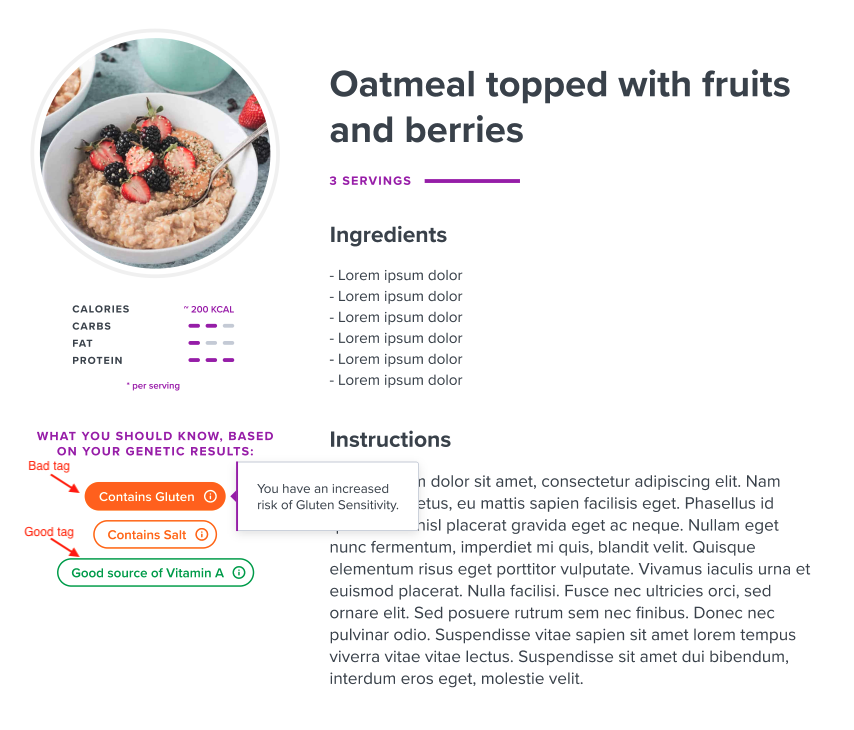
Since the gluten tag is linked with Gluten Sensitivity report, we can show the report outcome of the concerned profile if their gluten sensitivity report is generated.
Tag conditions (optional)
Each tag can be associated with a set of conditions, which are returned in the conditions field with each tag. Again, you may choose to completely ignore the conditions returned in the response, and just use the tags as per your convenience.
The purpose of tag conditions is to alter meal or tag visibility on the UI based on certain attributes associated with a profile.
There can be two types of conditions returned:
- Genetic report outcome based
outcome_idwould be populated andbase_question_option_idwould be null.outcome_idrepresents the outcome of the report that is tied with the tag.
- User feedback response based
base_question_option_idwould be populated andoutcome_idwould be null.- For now, these conditions can simply be ignored. We are in the process of developing a special diet questionnaire, which users would be able to attempt. The questionnaire will cover all questions associated with the diet, like food sensitivities, allergies, etc. If a user finishes the questionnaire, and then accesses the optimal diet, then these conditions can be used to give users a customised meals experience based on their feedback to that questionnaire.
At a time, both outcome_id and base_question_option_id cannot be populated, but either one of them would always be populated in a condition.
The effect field can have 3 possible values that represents the effect this condition has on the meal and tag visibility when matched.
- 0 - Hide meal (if condition is matched, do not show meal in the UI as part of the optimal diet)
- 1 - Show meal, hide tag (if condition is matched, show the meal, but remove the tag)
- 2 - Show meal, show tag (if condition is matched, show both the meal and the tag - default behaviour)
The override_text and override_color are optional fields associated with the condition that become relevant only when the condition is 2 - Show meal, show tag, because that's the only case when the tag is displayed. The intended purpose of these fields is that if the values of these fields are populated, then as the name suggests, the text and color of the tag is supposed to be overridden with these fields, and if not provided, the default text and color of the tag is supposed be used while displaying the tag.
As mentioned earlier, one tag can have multiple conditions associated with it. To determine the order on which the conditions are supposed to be applied, a priority, which is an integer field, is returned with each condition.
Note: 1 is considered higher priority than 2.
Example
Tag
report: Gluten sensitivity
text: "Contains Gluten"
color: orange
1st Condition
priority = 1
effect = Hide meal (0)
base_question_option = Sensitive to Gluten
outcome = null
2nd Condition
priority = 2
effect = Show meal, show tag (2)
base_question_option = null
outcome = Sensitive to Gluten
3rd Condition
priority = 2
effect = Show meal, hide tag (1)
base_question_option = null
outcome = Not Sensitive to Gluten
Case 1
User responded they are sensitive to Gluten in the diet questionnaire (in progress).
Intended behaviour: They are not supposed to be shown the meal to begin with, because the first condition will be matched and the meal is intended to be skipped.
Case 2
User responded that they are not sensitive to Gluten, or did not respond to the feedback question. However, their genetic report suggests that they are sensitive to gluten.
Intended behaviour: First condition will not be matched, hence 2nd condition will be visited. The meal would be shown. While displaying the meal, as per the effect in the 2nd condition, the tag would be displayed. Since there is no override_color or override_text field populated, the tag would be displayed with text at tag level: “Contains Gluten” and with color orange.
Case 3
User responded that they are not sensitive to Gluten, or did not respond to the feedback question, and their genetic report suggests that they are not sensitive to gluten.
Intended behaviour: The first and 2nd conditions will not be matched. The meal would be displayed, but the tag will be hidden, because the 3rd condition would be matched.
Note
The endpoint always returns a list of all meals associated with the diet. It is up to the frontend application whether to use these tags and conditions to hide certain meals, or hide / alter certain tags based on these conditions. Hence, these conditions are completely optional.