Reports Service API
- Reports Service API
Basic Usage
There are four basic actions:
- Listing Reports
- Generating Reports
- Checking Report Status
- Composing Reports
Listing Reports
Endpoints:
/report//report-summary/
Both accept the same set of query parameters, however there are two differences:
report-summaryreturns only a subset of all report fieldsreportautomatically filtersvisible_toandvisible_to_genders
For better performance, we recommend you use report-summary and sending appropiate visible_to and visible_to_genders data in request query params, unless you require report only fields.
(report endpoint will apply this filter automatically)
Query Parameters
The major query parameters are listed below, please check the report-summary endpoint api docs for a full list:
q- this provides a multilingual search on thenameandsummaryfields (matches English + cookielanguage (see Internationalization))listing_type- "medicinial" = Health Reports
- "non-medicinial" = Traits
- "experimential" = Biohacker Reports
- "category" = Summary Reports
area- filter areas e.g. "brain", "sleep", etc...status- the report status e.g. "completed", "processing", "failed" etc...visible_toandvisible_to_genders- not all reports are visible to all user groups e.g. the Male Fertility report is not visible to female users. Note: users will not be able to generate reports that are not visible.sort-updated_at,name, etc...pageandpage_size
Notes
One - profile_id
To filter or sort by profile specific data e.g. risk score or report status, the request must contain profile_id parameter.
Two - AND or OR
All independent filters are AND, but all multioption filters are OR
Examples:
?listing_type=medicinial&q=blood
returns reports with listing_type="medicinial" AND "blood" in name or summary
?area=brain,sleep
returns all reports linked to either brain OR sleep
Generating Reports
Endpoint: /profile-report/
This endpoint accepts both single and bulk requests. There is no limit on the number of reports that can be generated in a single request. However, bulk requests can only be made for one profile at a time.
Single Request:
{
  "profile_id": "f896eae4-4f3b-4f21-8be4-c70206ea327e",
  "report_id": "51b7f2d5-98b6-4388-ad3e-97a0ebcd35f7"
}
Bulk Request:
[
  {
    "profile_id": "f896eae4-4f3b-4f21-8be4-c70206ea327e",
    "report_id": "51b7f2d5-98b6-4388-ad3e-97a0ebcd35f7"
  },
  {
    "profile_id": "f896eae4-4f3b-4f21-8be4-c70206ea327e",
    "report_id": "5a05fa11-39c7-4332-bed8-a0d95ba9f6db",
  },
]
Checking Report Status
Endpoint: /profile-report/
Use the profile_id query param to get all profile reports for a given profile:
/profile-report/?profile_id=f896eae4-4f3b-4f21-8be4-c70206ea327e
Each profile report has a status field with options: "failed", "processing", "completed". Only "completed" reports will be viewable.
Constructing Reports
Endpoints:
/report//profile-report//profile-recommendation//profile-recommendation-trait//profile-trait/
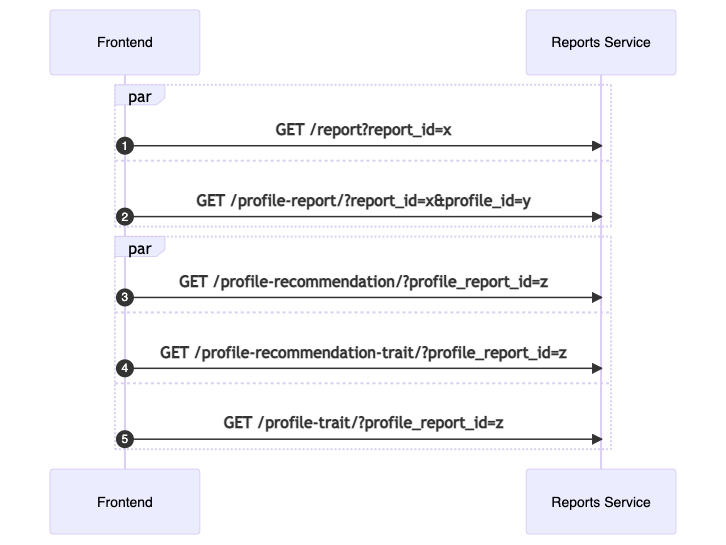
Flow
For report_id = x, profile_id = y
In parallel:
- Check report exists
/report/x - Check profile-report exists and status="completed":
/profile-report/?report_id=x&profile_id=y
Assume returned profile_report_id is z
In parallel:
profile-recommendation/?profile_report_id=z/profile-recommendation-trait/?profile_report_id=z/profile-trait/?profile_report_id=z
Composing Reports
The five above requests contain all the required information to compose a report.
Breakdown of ProfileTrait
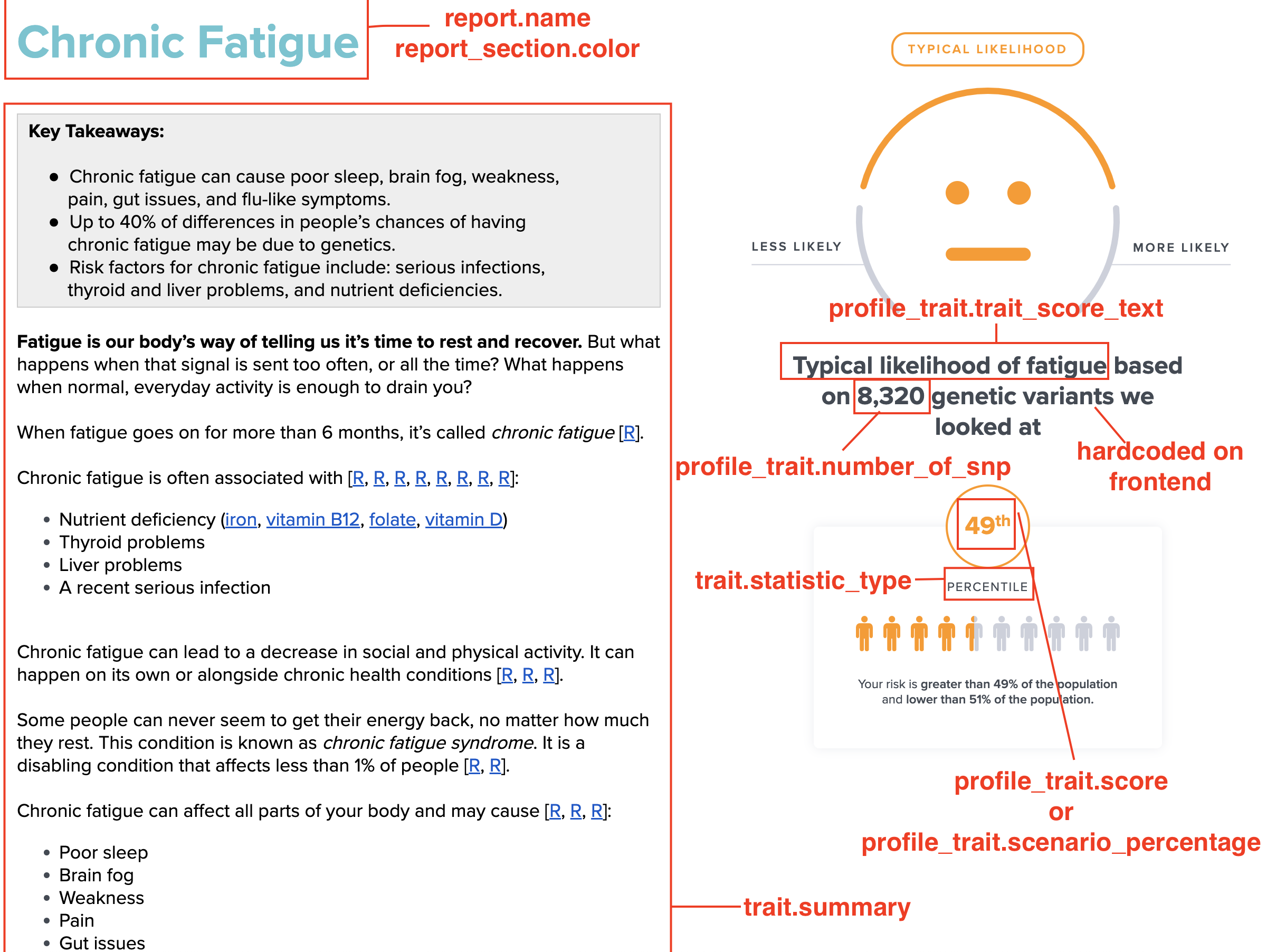
Each profile report is associated with a particular outcome for that report. This outcome is encapsulated in the profile-trait response.
Here is an example profile-trait response (text has been abbreviated):
{
    // meta data
    "id": "7048f855-e266-4f86-bf8c-2954c4e3af14",
    "profile_id": "adfbc357-d2d2-462c-a417-22474fddd646",
    "profile_report_id": "178711fb-1aa3-4498-a5c6-e60d49b57f3c",
    "trait_id": "67d64155-1944-4bf3-b7df-b0fbeed27984",

    // outcome fields
    "score": 0.8,
    "scenario_id": null,
    "scenario_percentage": null,
    "matched_case": null,

    // personalized
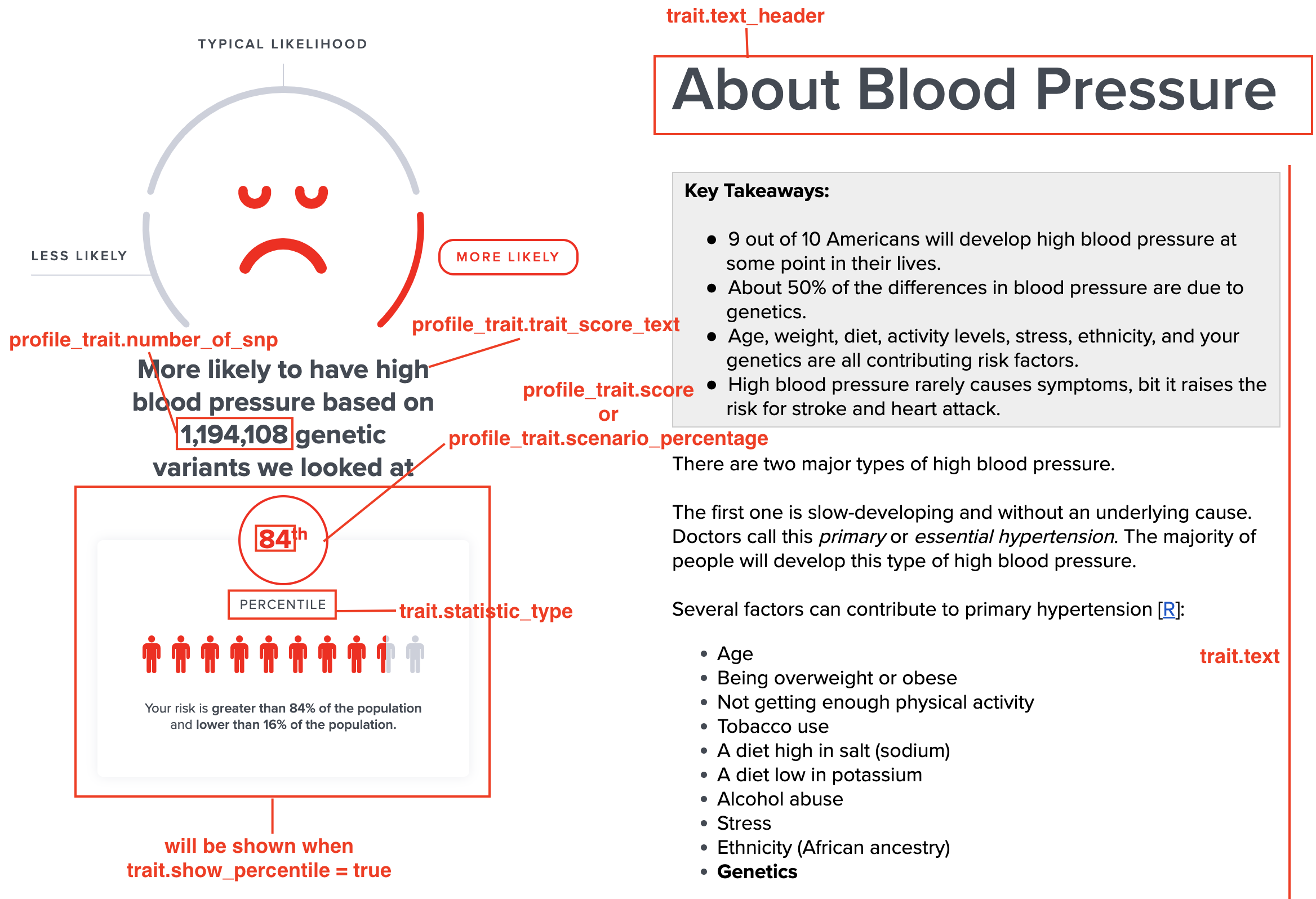
    "trait_score_text": "Likely higher lactate levels",
    "personalized_text": null,
    "personalized_recommendation_text": null,
    "number_of_snp": 353451,
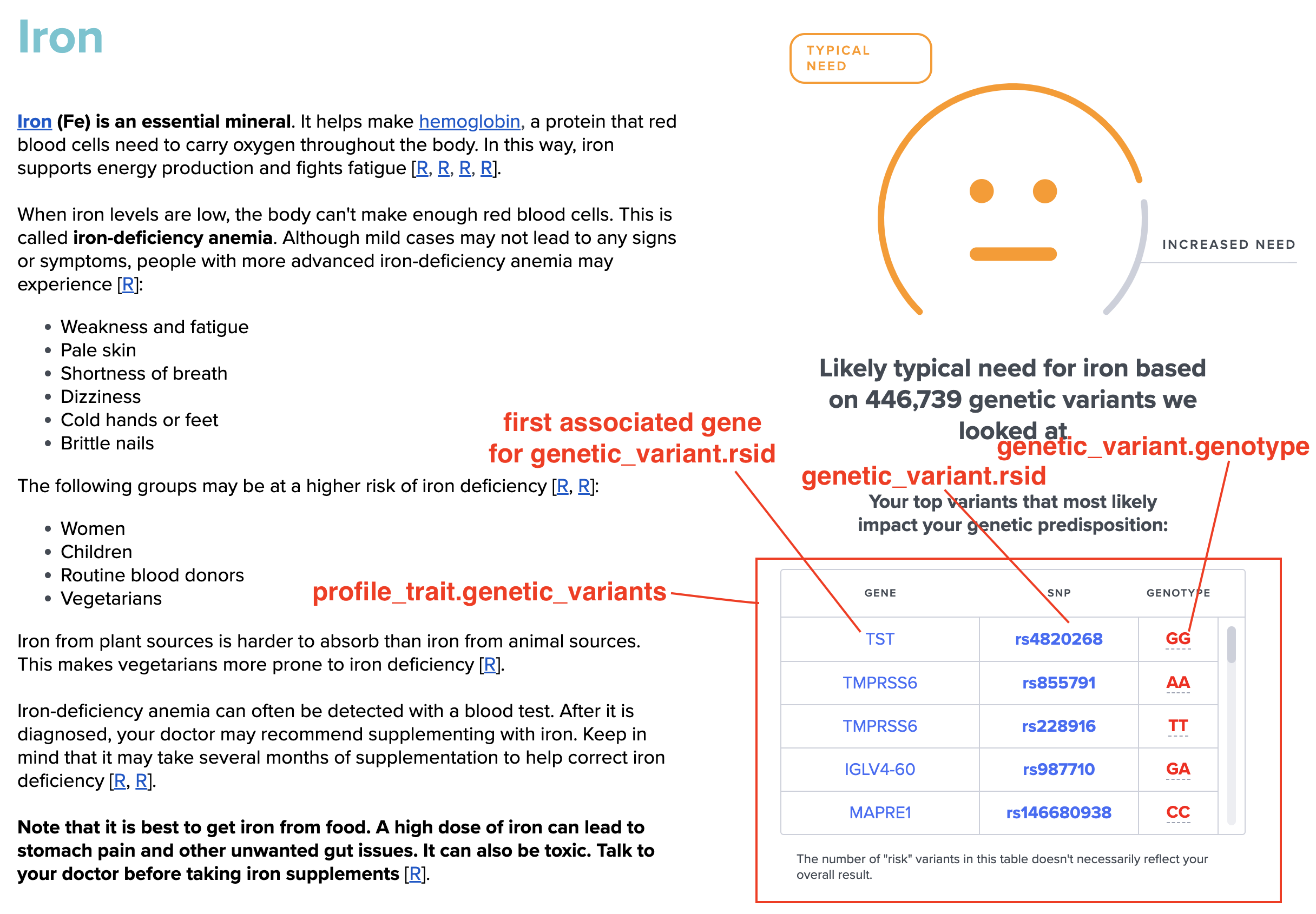
    "genetic_variants": [],

    // feedback
    "user_feedback": null,

    // trait info (non-personalized)
    "trait": {
        // meta data
        "id": "67d64155-1944-4bf3-b7df-b0fbeed27984",
        "slug": "39e3b79e-4177-4b88-acbb-abea3f506d18",
        "report_id": "2735f15d-3124-4d9c-8ff1-9262b44292f6",

        // text fields
        "name": "Lactate",
        "summary": "",
        "text": "...",
        "text_header": "Genetics of Lactate Levels",
        "genetic_intro": "",
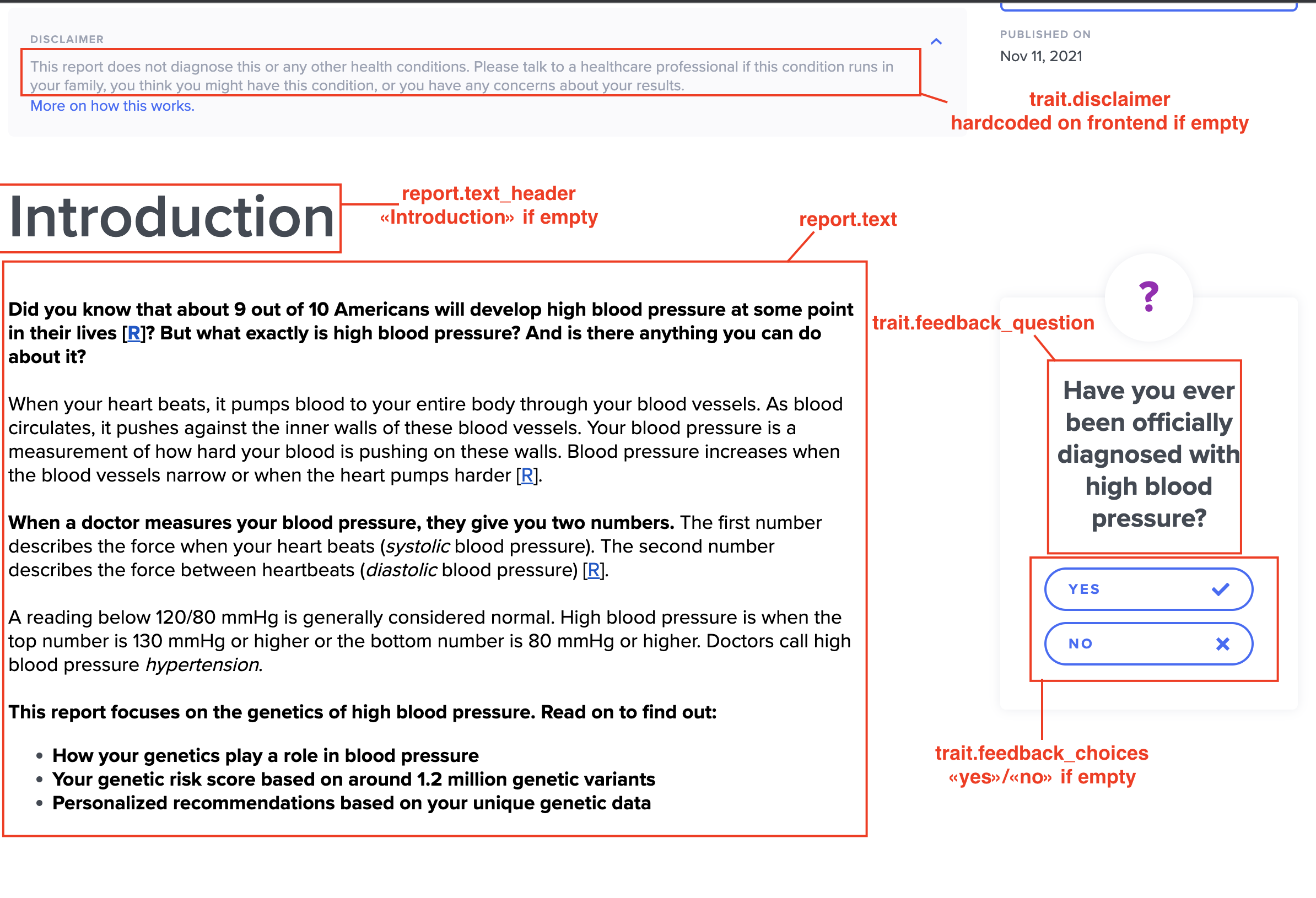
        "disclaimer": "...",

        // other
        "model_type": "additive", // determines expected outcome type
        "show_percentile": false, // UI toggle
        "statistic_type": "percentile", // percentage vs percentile (if percentage, should display scenario_percentage)

        // feedback
        "feedback_question": "Have you ever been told your lactate levels are high?",
        "feedback_choices": [],

        // gauge fields
        "gauge_title": "",
        "gauge_subtitle": "",
        "gauge_type": "emoji",
        "gauge_range_type": "segmented",
        "gauge_coloring": "block",
        "gauge_direction": null,
        "gauge_num_of_divisions": 2,
        "gauge_labels": [
            {
                "id": "195a3071-25b4-41da-9d8d-96f10c2cf07b",
                "label_text": "Higher Levels",
                "label_sub_text": "",
                "label_color": "red",
                "ratio": null,
                "display_order": 2,
                "sub_case": null,
                "score_from": 0.8,
                "score_to": 1,
                "scenario_id": null
            },
            {
                "id": "ae3abb67-165b-48d0-a957-801f58ce8d32",
                "label_text": "Typical Levels",
                "label_sub_text": "",
                "label_color": "yellow",
                "ratio": null,
                "display_order": 1,
                "sub_case": null,
                "score_from": 0,
                "score_to": 0.8,
                "scenario_id": null
            }
        ]
    },

}
Report Outcomes
{
  //...

  // outcome fields
  "score": 0.8,
  "scenario_id": null,
  "scenario_percentage": null,
  "matched_case": null,

  "trait": {
    //...
    "model_type": "additive"
  }
}
There are four underyling generation mechanics - score, scenario, case and empty. The type can be inferred from the model_type field in the trait object:
- "additive" -> score
- "non-additive" -> scenario
- "combined" -> case
- "empty" -> empty
Score
Additive traits have an associated score. This is the score field. It roughly corresponds to the the profile's percentile when compared with our baseline dataset. Higher score typically means higher risk.
Scenario
Scenario based reports have an associated scenario id. This is the scenario_id field. It corresponds to a predefined distinct outcome. For example: predisposed to lactose intolerance or not.
Case
Only combined reports have cases. Each case corresponds to a particular combination of sub report results. For example, better response to protien, normal response to carbohydrates and better response to fats map to a unique case.
For more details see Combined Report Outcome - Case
Empty
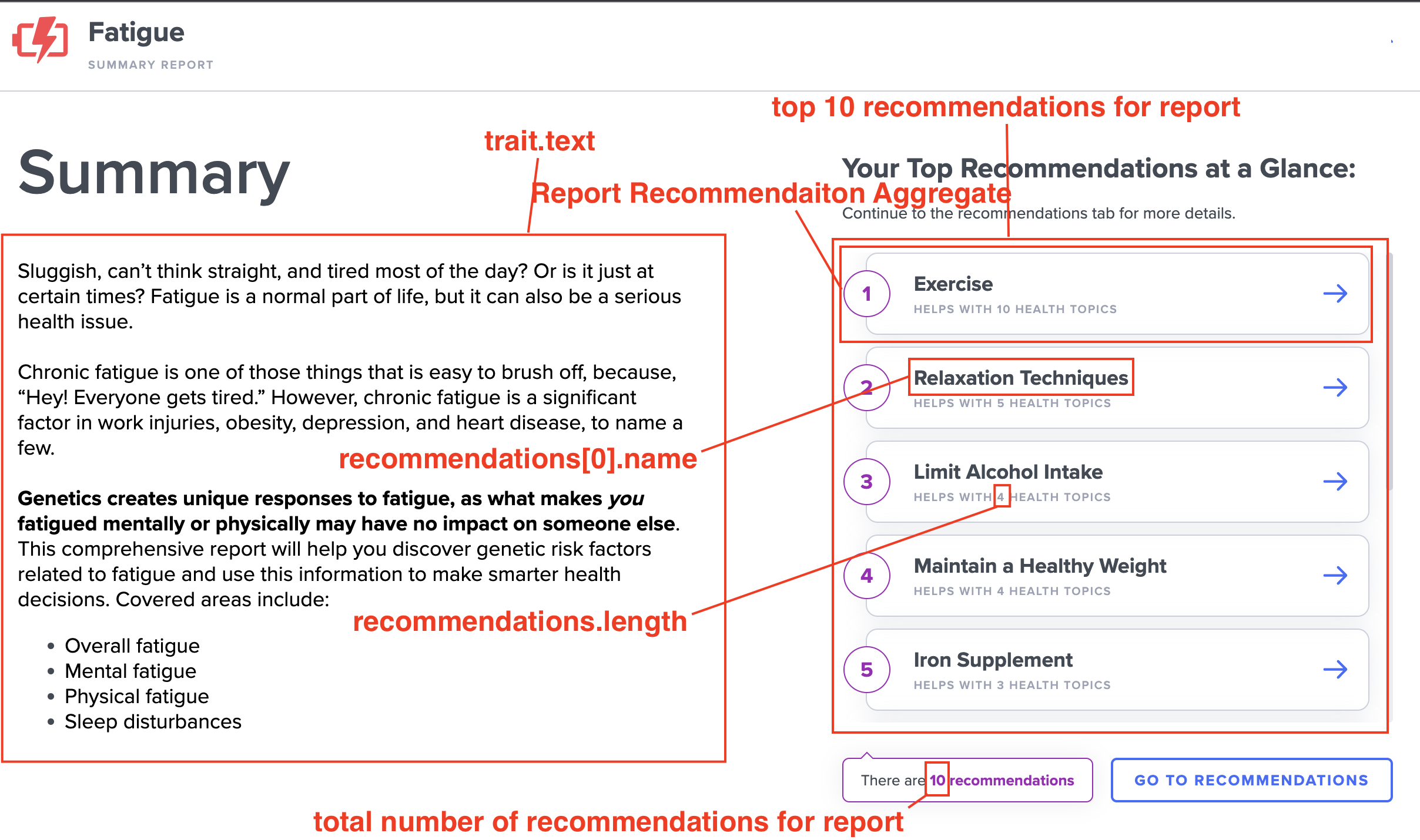
Aggregate reports (e.g. Fatigue) are simple aggregates of many sub reports. They have no associated outcome. Consequently, all outcomes fields will be null.
Report Gauges
There are three gauge types. The gauge type is exposed via trait.gauge_type field:
- emoji
- needle
- pie (see here)
These are further customized through the gauge_labels (where matching range, color and label text can be configured), and gauge_coloring, gauge_direction and gauge_range_type fields.
Example payload:
{
  // ...
  "trait": {
    // ...
    "gauge_title": "", // pie chart only
    "gauge_subtitle": "", // pie chart only

    // emoji, needle or pie
    "gauge_type": "emoji",

    // segmented, continuous or null
    // determines whether needle should point at exact value
    // or just centre of the segment
    "gauge_range_type": "segmented",

    // block or gradient
    // whether gauge colors should be gradiented or block colors
    "gauge_coloring": "block",

    // clockwise, counterclockwise (null => clockwise)
    "gauge_direction": null,

    // number of segments (null => 3)
    "gauge_num_of_divisions": 2,

    "gauge_labels": [
      // ...
      {
        "id": "195a3071-25b4-41da-9d8d-96f10c2cf07b",
        "label_color": "red",
        "label_text": "Higher Levels",
        "label_sub_text": "", //pie chart only
        "ratio": null, //pie chart only
        "display_order": 2,

        // outcome match
        "sub_case": null,
        "score_from": 0.8,
        "score_to": 1,
        "scenario_id": null
      },
    ]
  }
}
Gauge Defaults
Needle gauges require all gauge fields and gauge labels to be inputted.
Emoji gauges accept defaults when the relevant fields are null. Default ranges are: 0.0-0.2 and 0.2-1.0 for 2 segmenet gauges, and 0.0-0.2, 0.2-0.8 and 0.8-1.0 for 3 segement gauges (or gauge_num_of_divisions is null).
Breakdown of ProfileRecommendation
The profile-recommendation endpoint returns a presorted list of recommendations from most to least useful (descending total_score). Recommendations that are judged irrelevant for the user (based on their specific results) will be marked as is_relevant=False and we do not display them on our frontend.
Example Payload (text has been abbreviated):
[
  {
    // meta data
    "id": "a8c7b7c7-aead-41d6-afc4-004fd3b3cf71",
    "profile_report_id": "44b3b2f6-f56b-4b40-9676-04ccef704f24",
    "recommendation_id": "9d71c416-b416-4494-b041-5eac7e65470d",
    "is_relevant": true, // we hide non-relevant

    // outcome
    "total_score": 1000, // how useful the recommendation is
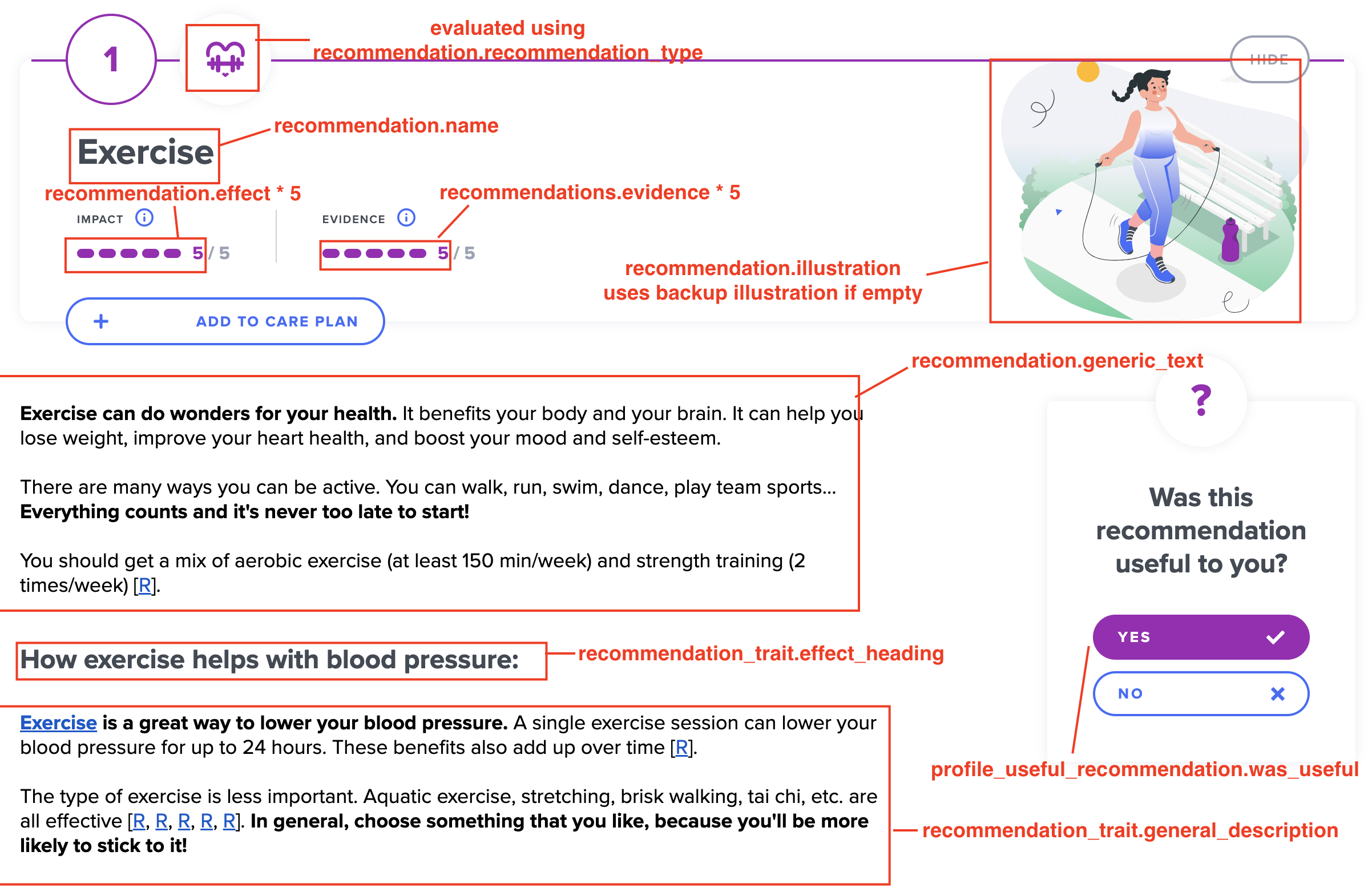
    "effect": 0.4, // effect of the recommendation
    "evidence": 0.6, // evidence for the recommendation

    // user feedback
    "was_useful": null,
    "user_hidden": false,

    "recommendation": {
      // meta data
      "id": "9d71c416-b416-4494-b041-5eac7e65470d",
      "slug": "maintain-healthy-weight",
      "report_id": "0dad0d4c-ba5d-4409-a8e8-f7832540b84b",
      "context": "report",
      "recommendation_type": "lifestyle",

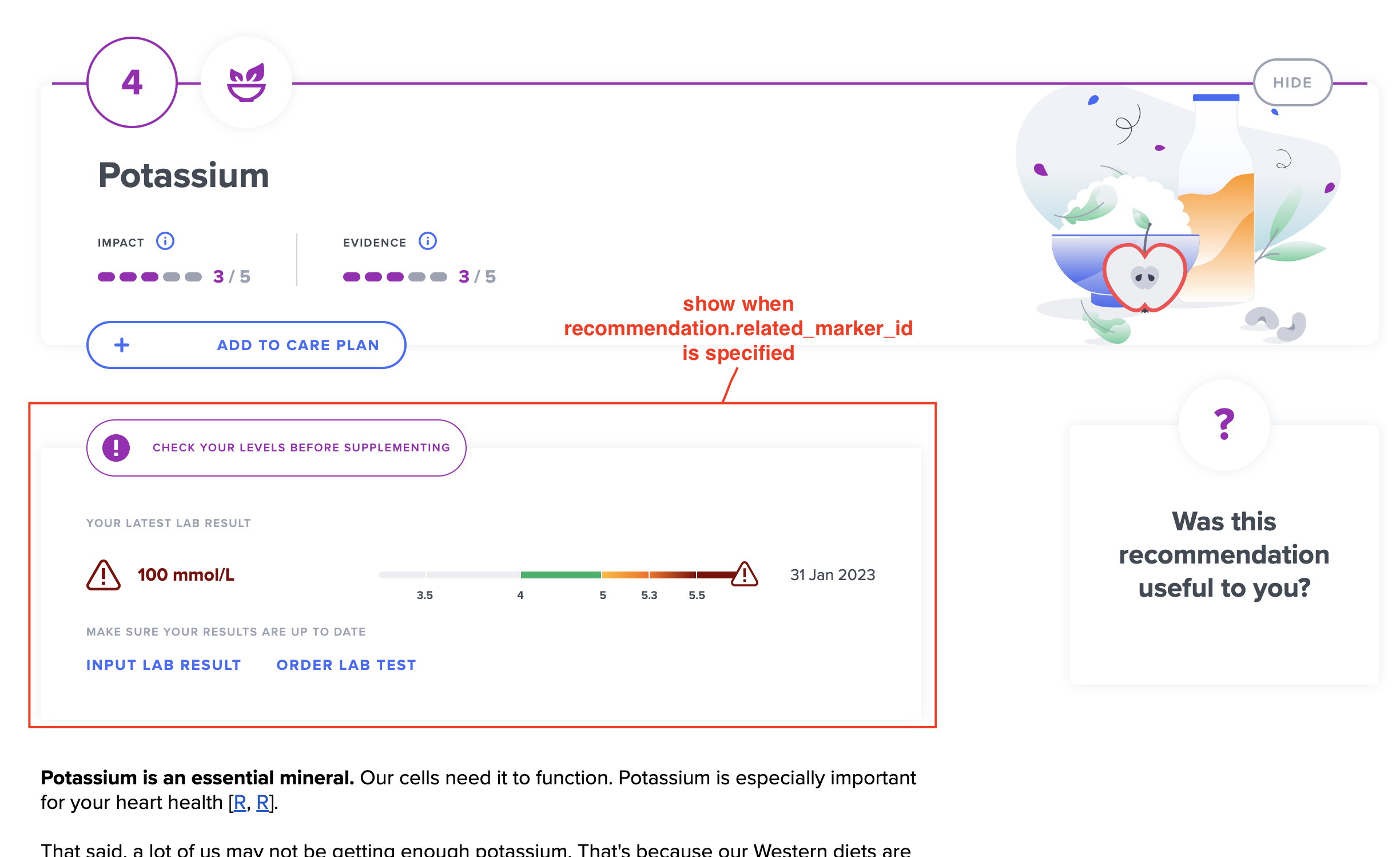
      // related marker
      // e.g. vitamin D recommendation
      // might point to marker for vitamin D
      "related_marker_id": null,

      // text or UI
      "name": "Maintain a Healthy Weight",
      "generic_text": "...",
      "sentence": "Try to maintain a healthy weight.",
      "illustration": "https://selfdecode.com/cdn/media/reports/Maintain_a_Healthy_Weight.svg",
      "hide_impact_evidence": false,

      // fields used in combination with care plan
      "is_avoidance_recommendation": false,
      "is_treatment": false,
      "is_prevention": false,
      "default_frequency_value": null,
      "default_frequency_unit": null,
      "default_duration_value": null,
      "default_duration_unit": null,
      "conflicting_slugs": []
    }
  }
]
Breakdown of ProfileRecommendationTrait
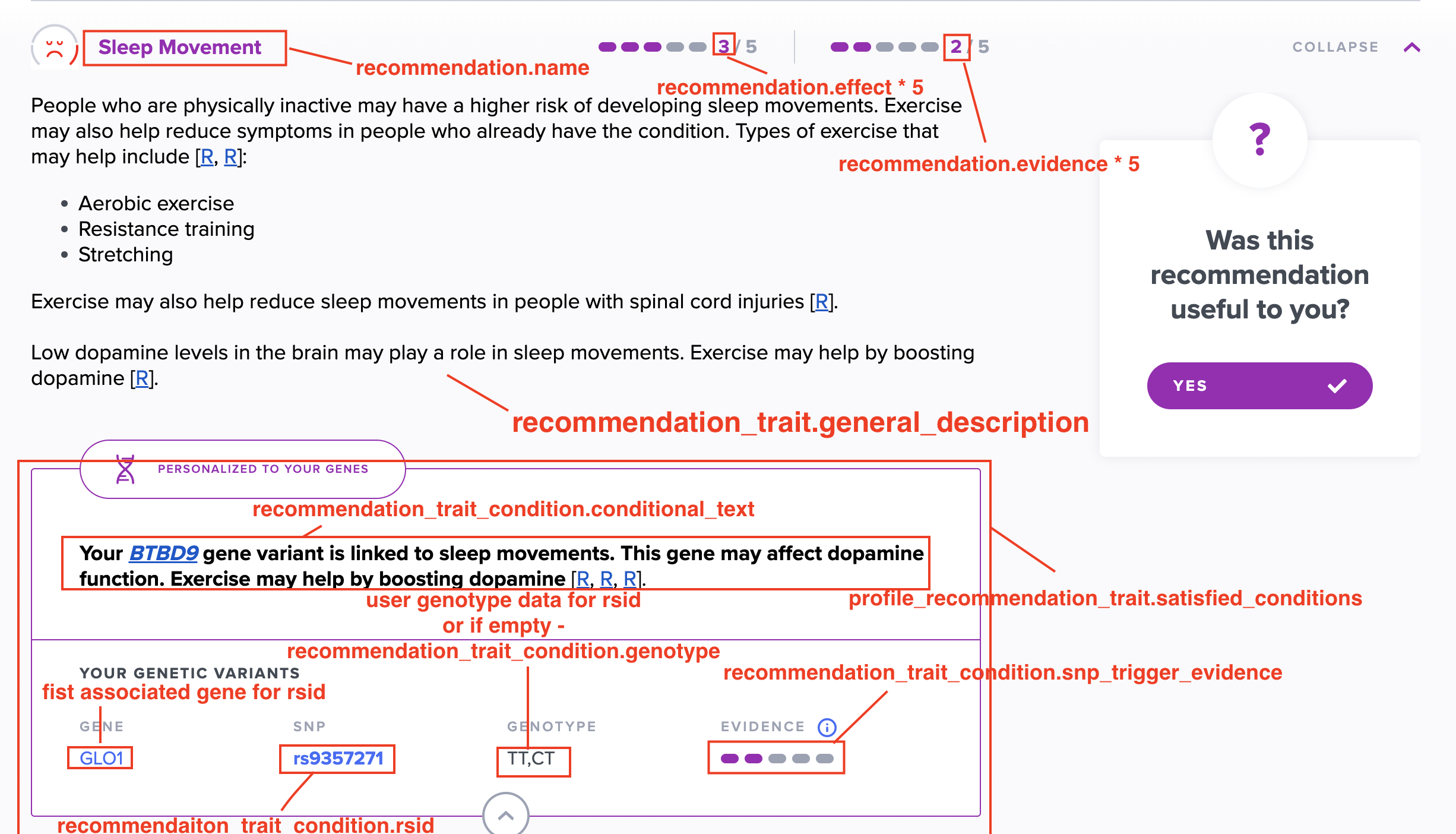
Whereas the profile recommendations represent generalized recommendations ordered by usefulness to the individual, profile recommendation traits personalize the recommendation itself. They link to a number of satisified conditions which each contain a conditional_text. This text provides perosnalized information and insight based on the profile's results and genes.
The profile-recommendation-trait endpoint returns a presorted list of recommendation traits from most to least useful (descending total_score). These should be understood in the connected of their matched profile recommendation (i.e. via profile_recommendation_id field).
ProfileRecommendationTraits include a satisfied_conditions field which returns an array of matched recommendation trait conditions. Each recommendation trait condition contains some conditionial_text which gives additional advice or context for the specific user.
Note that there are several possible types of recommendation trait condition (snp, trait score, case and scenario). Some fields may vary depending on the type in question.
Example Payload (text has been abbreviated):
{
    // meta data
    "id": "2be690f6-ea58-4124-ae55-4430c3f4dde1",
    "profile_report_id": "44b3b2f6-f56b-4b40-9676-04ccef704f24",
    "profile_recommendation_id": "ecf7d662-f845-438a-9d54-015c588578be",
    "recommendation_trait_id": "d6da65c9-12de-400d-b317-3a6cac594366",
    "is_relevant": true, // we hide non-relevant

    "recommendation_trait": {
        // meta data
        "id": "d6da65c9-12de-400d-b317-3a6cac594366",
        "recommendation_id": "80c22793-07d1-4ea8-8798-d6fff7b8be2e",
        "trait_id": "d9ce4bb0-1141-491e-b900-17f27dc137d8",

        // text fields
        "effect_heading": "How Selenium Helps With Underactive Thyroid",
        "general_description": "...",

        // effect + evidence
        "effect": 0.4,
        "evidence": 0.6,

        "initial_score": 11 // used internally in total score calc
    },

    // user outcome
    "total_score": 511,
    "satisfied_conditions": [
        {
            // meta data
            "id": "66b798ce-d704-4983-81d1-0486ddf5fb12",
            "recommendation_trait_id": "d6da65c9-12de-400d-b317-3a6cac594366",
            "condition_type": "SNP",
            "priority": 1,

            // text fields
            "conditional_text": "...",

            // used internally in total score calc + relevancy
            "conditional_score": 500,
            "evidence": null,
            "effect": null,
            "is_triggering": false,

            // snp rec trait condition specific fields
            "genotype": "AA,AC",
            "rsid": "rs2235544",
            "snp_trigger_evidence": 0.4,

        }
    ]
}
Summary Reports
There are two types of summary reports: aggregate and combined.
Aggregate reports collect all the results and recommendations from reports on a single topic, e.g. sleep. They provide a single, comprehensive point of access for diving into a particular health topic.
Combined reports are an extension of aggregate reports. In addition to categorising all information on a topic into sections, they provide further outcome advice depending on the specific combination of sub report results. Currently, there are only two combined reports: Diet and Nutrition and Fitness.
Summary Report Generation
Summary reports are generated using the same flow as standard reports: simply create a profile-report for the desired profile with the relevant report id.
The generation pipeline will guarantee that all sub reports are generated before marking the parent summary report as completed. In the case of combined reports, the matched case will also be assigned.
Note - generating a summary report will generate all sub reports associated with that summary report.
Aggregate Reports
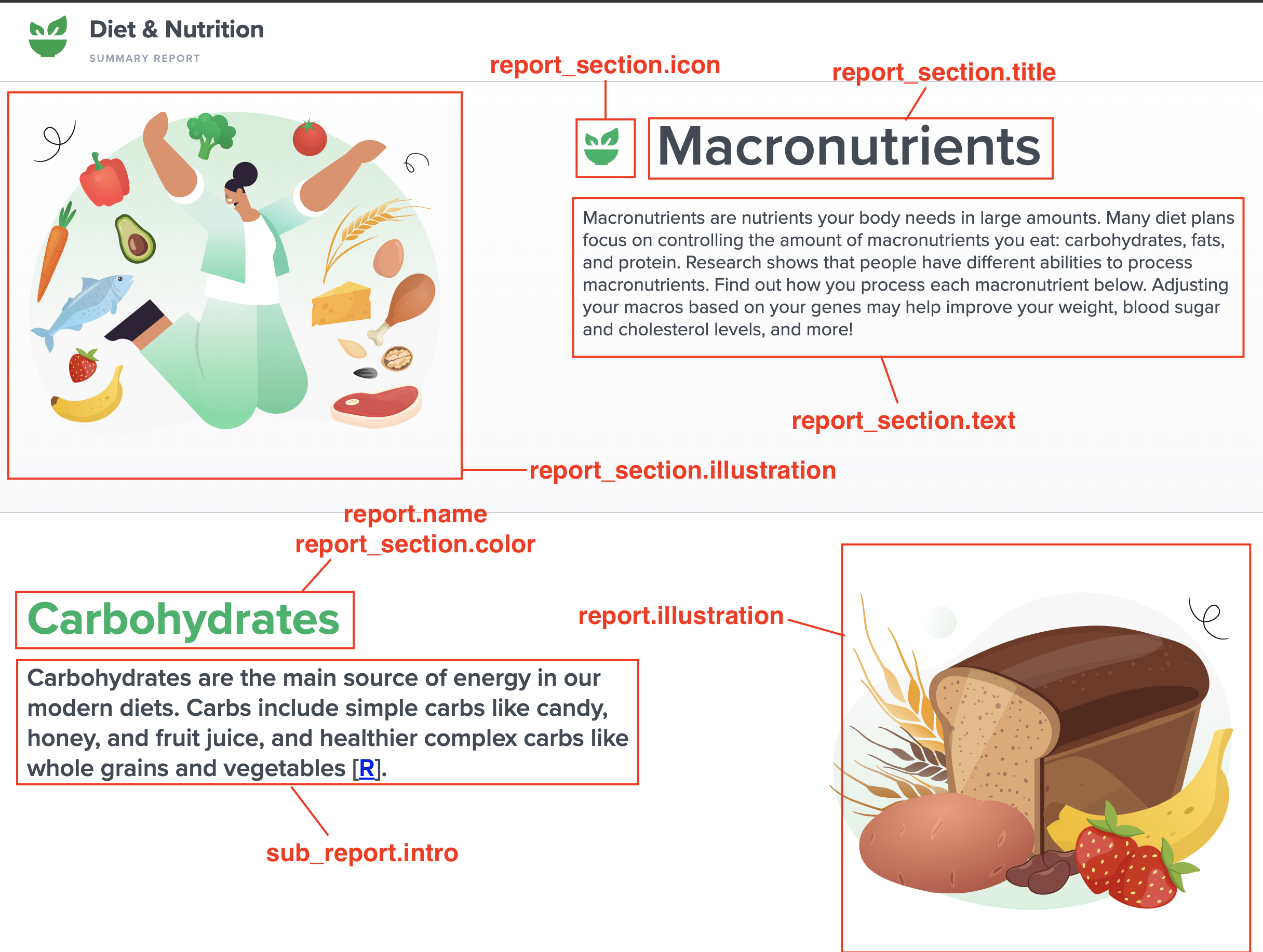
Aggregate and Combined reports are composed of report sections. Each report section in turn points to a number of sub reports. This information is located in the report_sections field of a report payload
Example Payload
{
  //...
  "report_sections": [
    {
      // meta fields
      "id": "6f929bc8-142d-4661-8085-9a7db20cd8a3",
      "slug": "sleep-disturbances",
      "report_id": "58f018e0-32e5-4c91-ba2a-ac161205094d",

      //text fields
      "title": "Sleep Disturbances",
      "text": "...",

      // ui fields
      "tooltip": "Sleep Disturbances",
      "color": "#2b7eef",
      "order": 4,
      "illustration": "...",
      "icon": "...",

      "sub_reports": [
        {
          "parent_report_id": "58f018e0-32e5-4c91-ba2a-ac161205094d",
          "child_report_id": "39bd8e00-5c1b-4280-9618-81baa829a740",
          "intro": "..."
        }
      ]
    }
  ]
}
Aggregate Reports have no associated outcome and will link to empty traits (all outcomes fields null). See Empty.
Aggregate Recommendations
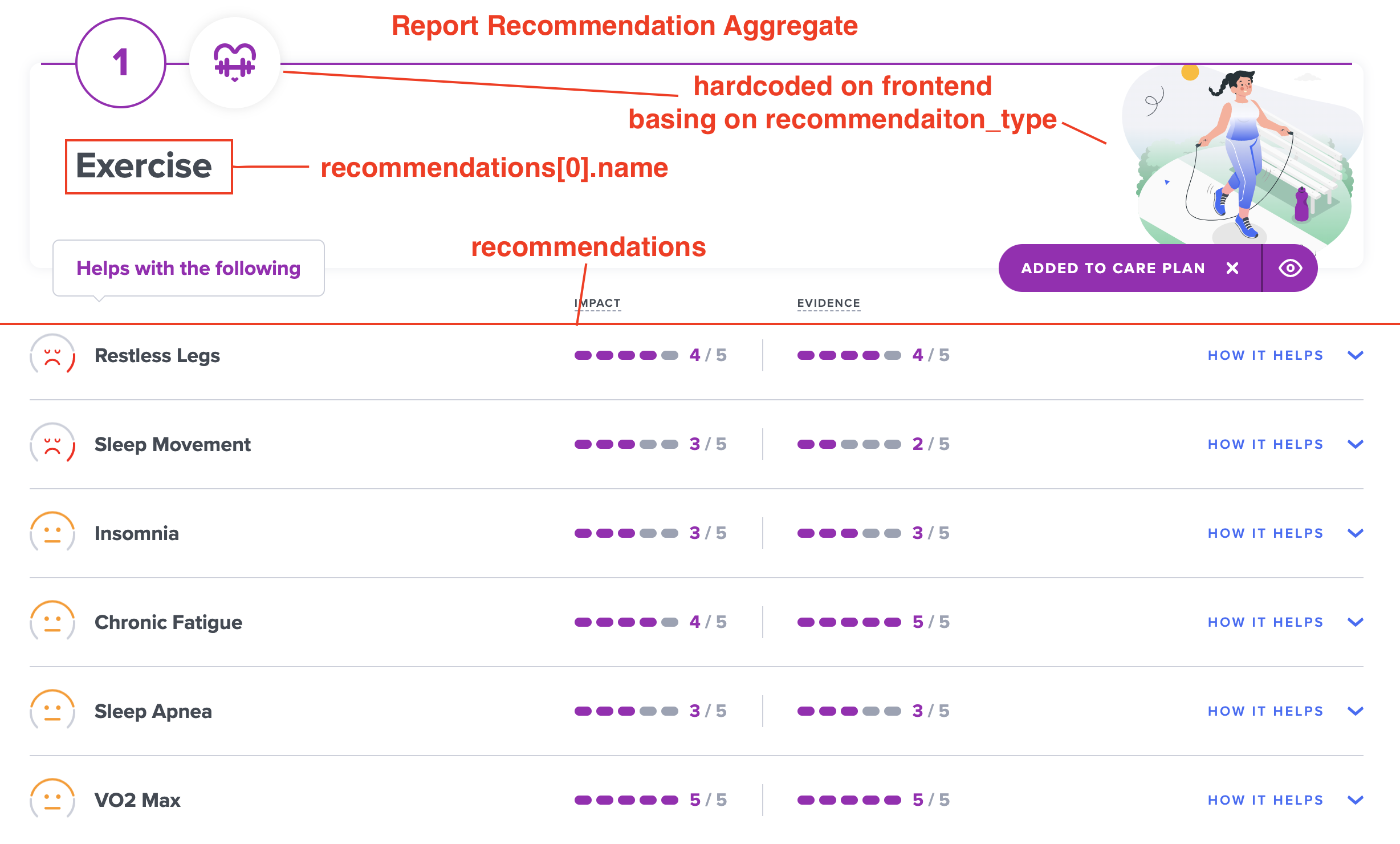
Summary reports have no recommendations of their own. Instead they aggregate the recommendations of their sub reports. To do this, they use a different endpoint: /recommendation-aggregate/.
A typical call might look like: /recommendation-aggregate/?profile_id=x&related_id=a,b,c&sort=color&should_filter_summary=true
where x is the profile_id and a,b and c are sub reports.
Example Payload:
[
  {
    "slug": "exercise",
    "total": 3605, // score for ordering
    "recommendations": [
      {
        // meta data
        "id": "0b0aa675-77f0-4cd0-8e93-82d835018c5f",
        "related_id": "9d7fd36f-8029-4a13-8fa3-73055c7f9f4c", //rec_id
        "context": "report",
        "recommendation_type": "lifestyle",
        "report_type": "standard",

        // text fields
        "name": "Exercise",
        "sentence": "Exercise regularly.",
        "generic_text": "...",
        "related_name": "Low Mood", //report name
        "area": ["brain", "pain & fatigue"], // report areas

        // care plan fields (internal)
        "is_avoidance_recommendation": false,
        "is_treatment": false,
        "is_prevention": false,
        "default_frequency_value": null,
        "default_frequency_unit": null,
        "default_duration_value": null,
        "default_duration_unit": null,
        "conflicting_slugs": [],

      // related marker
      // e.g. vitamin D recommendation
      // might point to marker for vitamin D
        "related_marker_id": null,

        // lab rec aggregates only fields (internal)
        "matched_range_name": null,
        "color": null,
      },
      // ...
    ]
  },
  // ...
]
Sorting:
Recommendations are grouped by slug and then sorted by the relative risk of their linked reports. Simplifing somewhat, red reports are weighted as 800, yellow as 200 and green as 50. Suppose exercise recommendation slug was tied to three reports, one red, one yellow and one green, it would receive a score of 800+200+50=1050. Recommendations aggregates are returned in descending order (i.e. highest risk first). Only reports included in related_id query param are counted.
should_filter_summary=true ensures that the recommendations only includes reports listed in related_id (otherwise all recommendations which match that slug will be returned).
The endpoint is paginated and can be customized via page and page_size query params.
Combined Reports
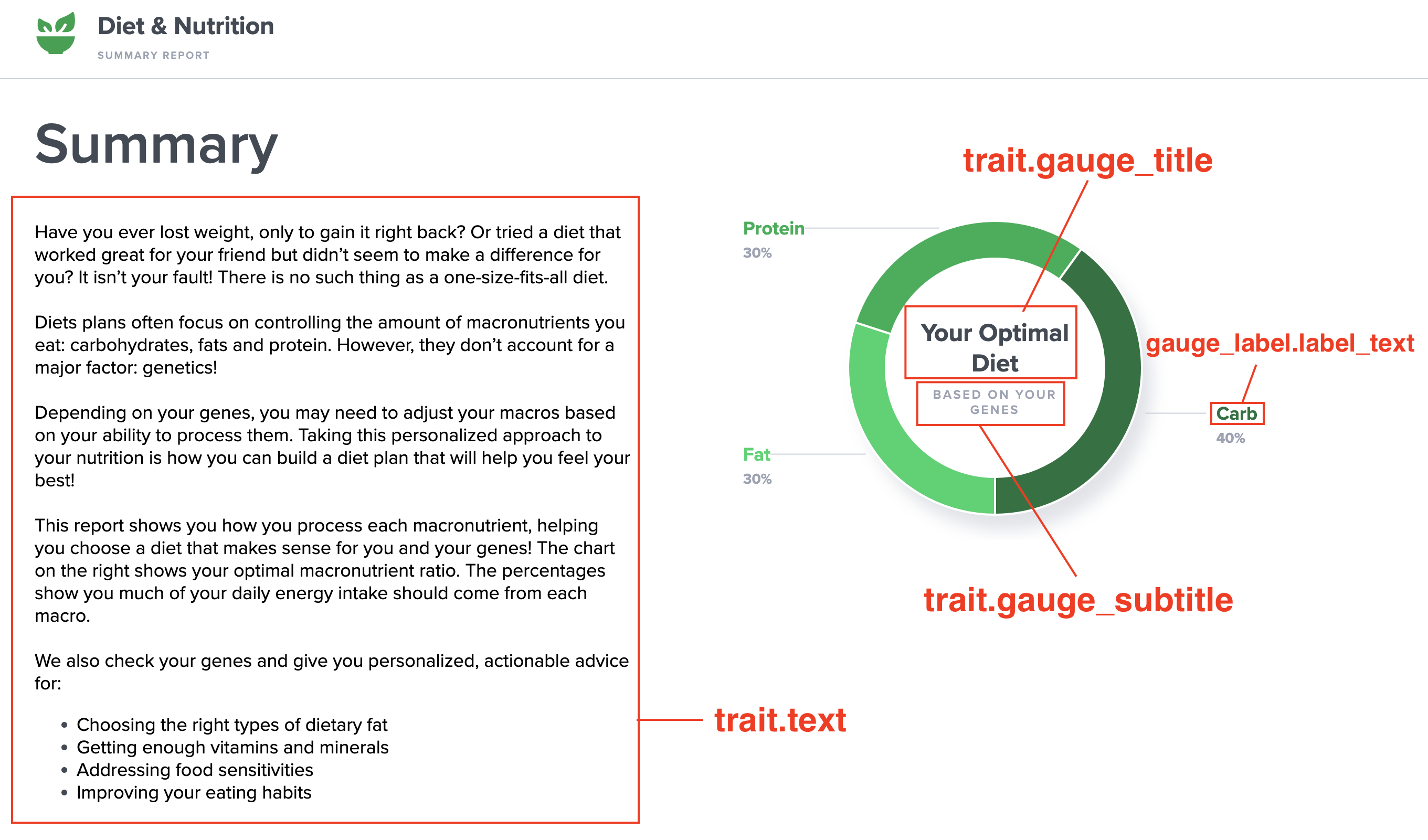
Combined Reports are almost identical to aggregate reports. They are organized into report sections that point to relevant sub reports. However, combined reports also have an outcome associated with the combination of certain sub report results (typically those included in the first report section). This outcome is represented as a matched_case and displayed through a pie chart.
Combined Report Outcome - Case
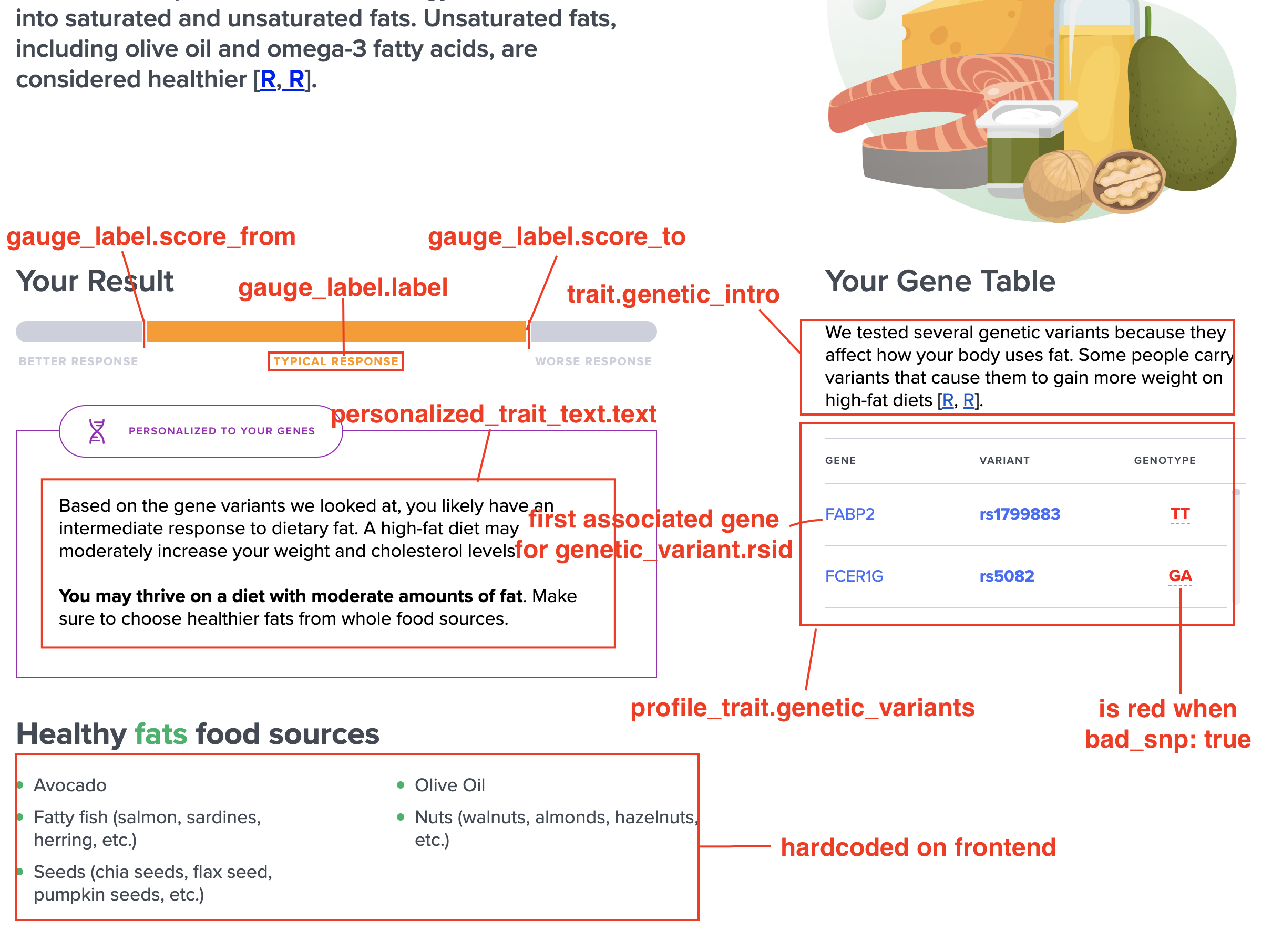
Combined reports (e.g. Diet and Nutrition and Fitness) are associated with a case id. This is the matched_case field. Each case corresponds to a particular combination of sub report results. For example, better response to protien, normal response to carbohydrates and better response to fats map to a unique case.
The most important field is the id. This is used to determine the correct gauge_labels to display.
In some cases there may also be additional information associated with each case. For example, the recommended sports for that profile.
Example:
{
  "id": "dba41f88-bfb0-4597-a67e-7cef9cc64cc1",
  "name": "yellow-green-green",
  "additional_info": {
    "results": ["basketball", "cycling", "surfing", "rugby", "wrestling"]
  }
}
Pie Chart
Pie Chart gauges are only used with combined model_type traits.
Example pie chart gauge label
{
    "id": "7d185ea0-50aa-4cc7-b2cb-4c5228715e78",

    "label_text": "Power",
    "label_sub_text": "",
    "label_color": "pie orange",

    "ratio": 40,
    "display_order": 1,
    "sub_case": {
        "id": "63c3993e-daa3-4962-bbf3-51687f69786e",
        "case_id": "14ddebbf-cb7e-459d-a5ca-f1cd2efa5dfd",
        "trait_id": "07a998de-56ab-4cac-9e93-39a07f30052e"
    },

    "score_from": null,
    "score_to": null,
    "scenario_id": null
}
Gauge labels should be filtered by the matched case id (i.e. matched_case.id). This should give you the same number of labels as expected slices in the pie chart. The ratio field is then used to distribute the pie among the slices.
Advanced Usage
- Internalization
- User Feedback (interactivity)
Internationalization
The report service supports multiple languages.
The service looks for language code specified in an sd-lang cookie,
and returns corresponding manually verified translated text (if available).
If no corresponding translations are found, the service will return English text.
Currently supported languages are:
- English
en(default) - Spanish
es - Hebrew
he - Bulgarian
bg
Not all reports have translations populated. If translations exist in the requested language for a given report, the field translation_verified (in report payload) will be true.
Note: make sure requests include a trailing slash e.g. /reports/report/2e2c2513-1938-408b-9266-d491f39d6d17/ otherwise the request gets redirected and header information can be lost
In rare cases, a report itself will be translated but some recommendations or recommendation traits will not yet have translations. Profile Recommendations and Profile Recommendation Traits now have a translation_exists field that will be True, if a translation is found for the queried language. You can also directly filter either endpoint by using the query param ?translation_exists=true.
User Feedback (interactivity)
Tracking read/unread
A profile report can be marked as read by making a put/patch request to profile-report endpoint.
PUT /profile-report/:profile_report_id (PATCH also accepted)
payload: {"has_read": true}
We automatically mark has_read as False on generation or regeneration
Hiding Recommendations
Users can hide individual profile recommendations by making a put/patch request to profile-recommendation endpoint.
PUT /profile-recommendation/:profile_recommendation_id (PATCH also accepted)
payload: {"user_hidden": true}
Answer Feedback Question
All reports have a feedback question (stored in ProfileTrait.trait.feedback_question).
Either there will be defined feedback choices or the answer will just be true or false (i.e. they have the condition or they don't).
Custom feedback choices can be found here:
ProfileTrait.trait.feedback_choices
To store feedback, send a POST request to profile-suffering-trait. This should either include is_suffering: boolean or feedback_choice_id: string (for custom feedback choices).
POST /profile-suffering-trait/
payload:
{
    "profile_id": "f896eae4-4f3b-4f21-8be4-c70206ea327e",
    "trait_id": "g096eae4-3c3b-9f23-8be4-u40ea327206e",
    "is_suffering": true
}
The last feedback can be viewed in ProfileTrait.user_feedback field.
Recommendation Feedback
POST /profile-userful-feedback/
payload:
{
    "profile_id": "f896eae4-4f3b-4f21-8be4-c70206ea327e",
    "recommendaiton_id": "g096eae4-3c3b-9f23-8be4-u40ea327206e",
    "was_useful": true
}
Readable at ProfileRecommendation.was_useful
Frequently Asked Questions
What is the difference between Health Reports and Traits?
From api perspective there is no difference between Health Reports and Traits.
This is just a distinction we make between reports whose main purpose is medicinal
and those that are more playful. Traits correspond to reports that have listing_type="non-medicinal"
while Health Reports have listing_type="medicinal". You can just the listing_type query param to fetch only
one or the other from either /report/ or /report-summary/ endpoint
How can I show a short description or summary of a report?
Reports have a summary field (on both /report/ or /report-summary/ endpoints) which contains a brief description of the report. Note, however, that for reports whose name is self-explainatory the summary field may be empty. Also our qa environment is not as well populated as our production environment.
Labelled Diagrams
Standard Reports
Banner (regular)
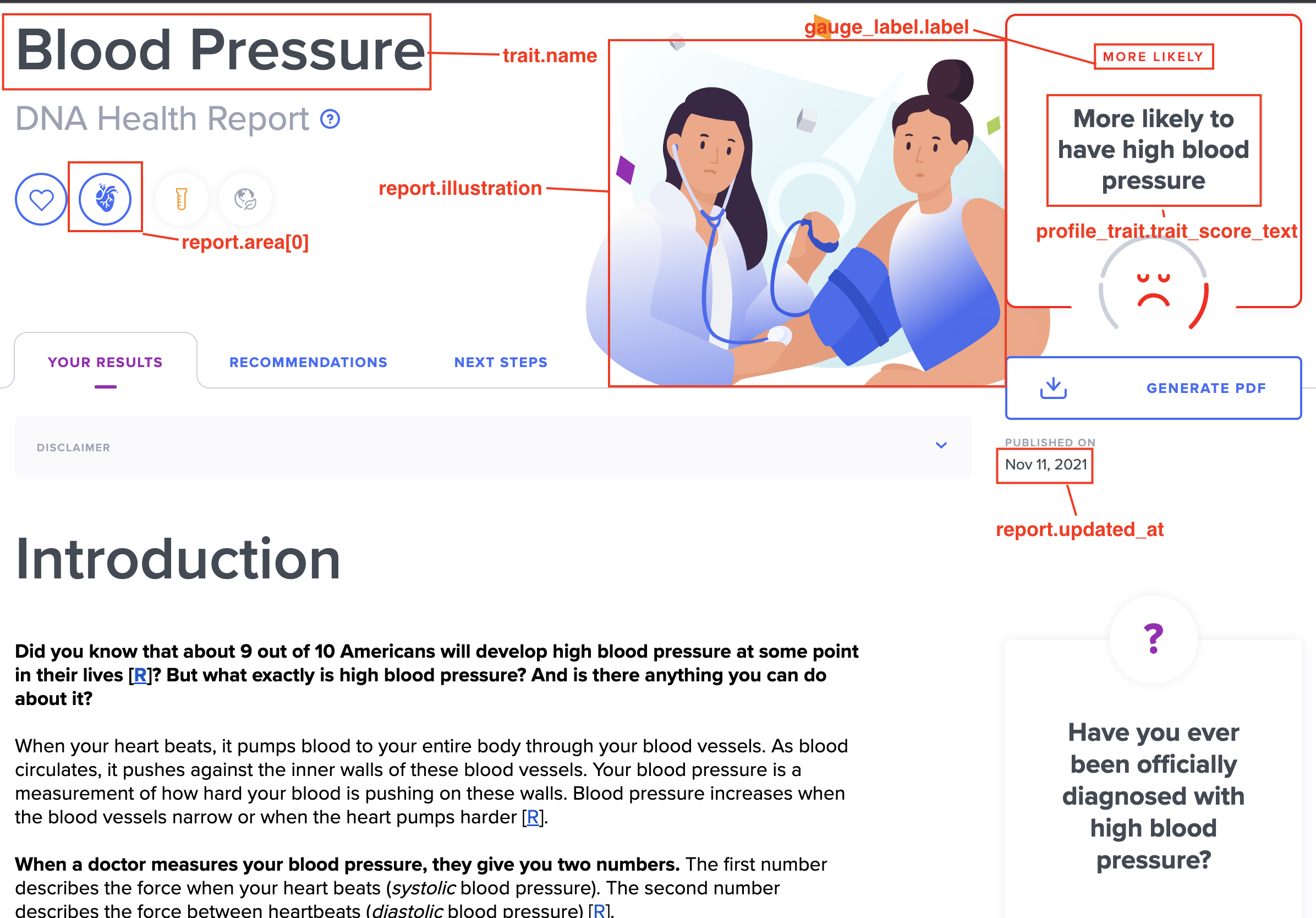
Your Results (regular)
Recommendations (regular)
Next Steps (regular)
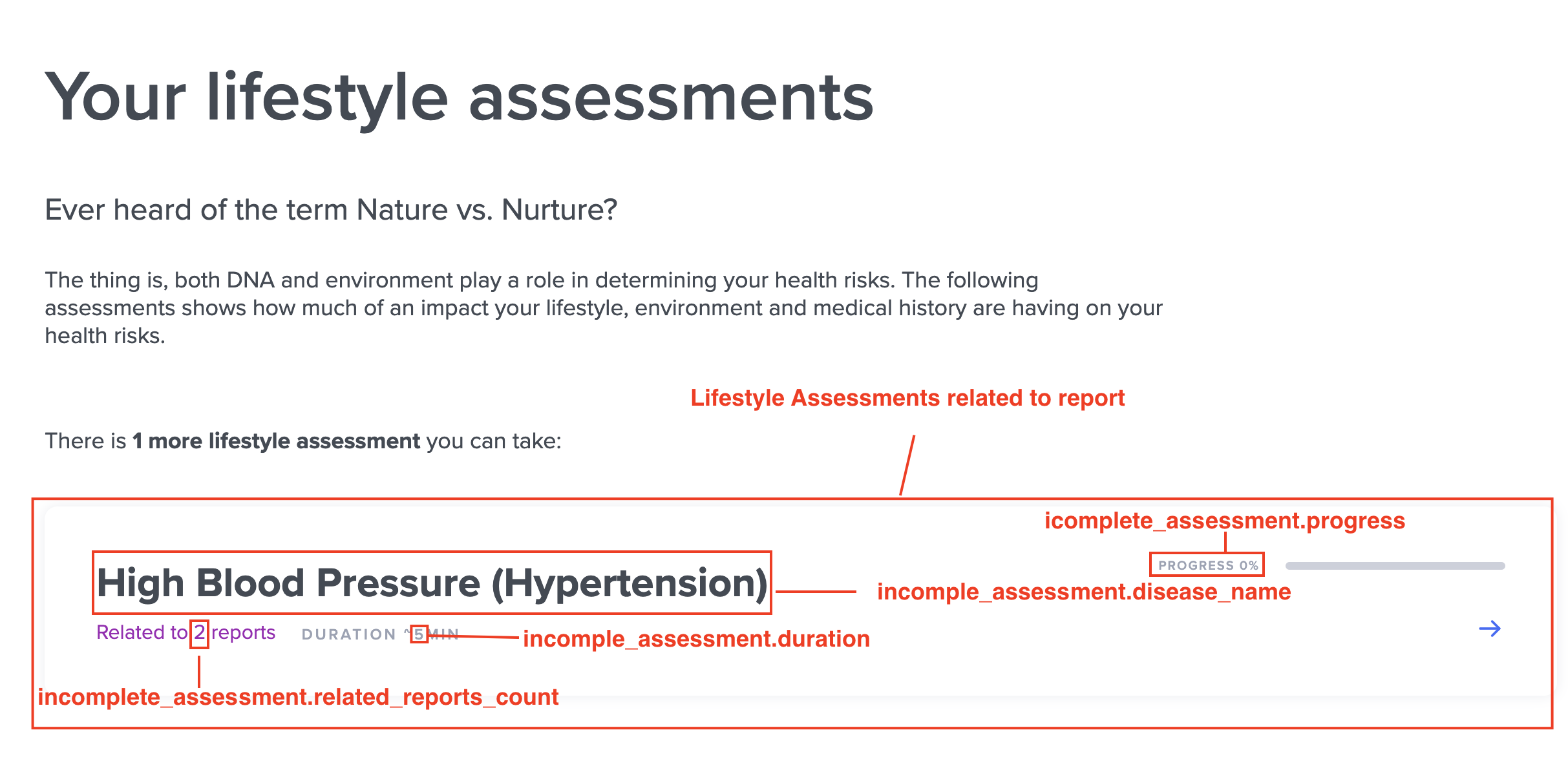
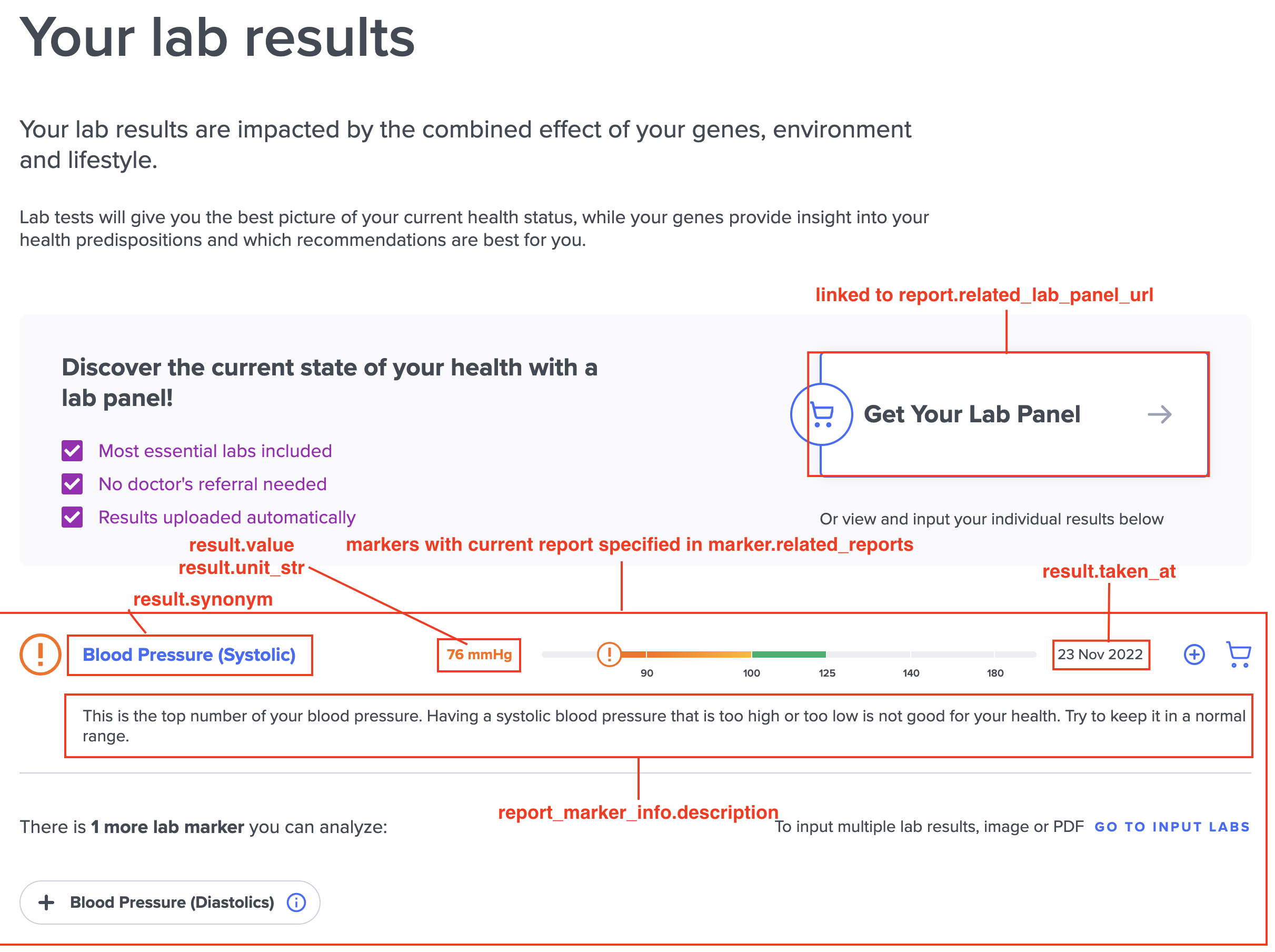
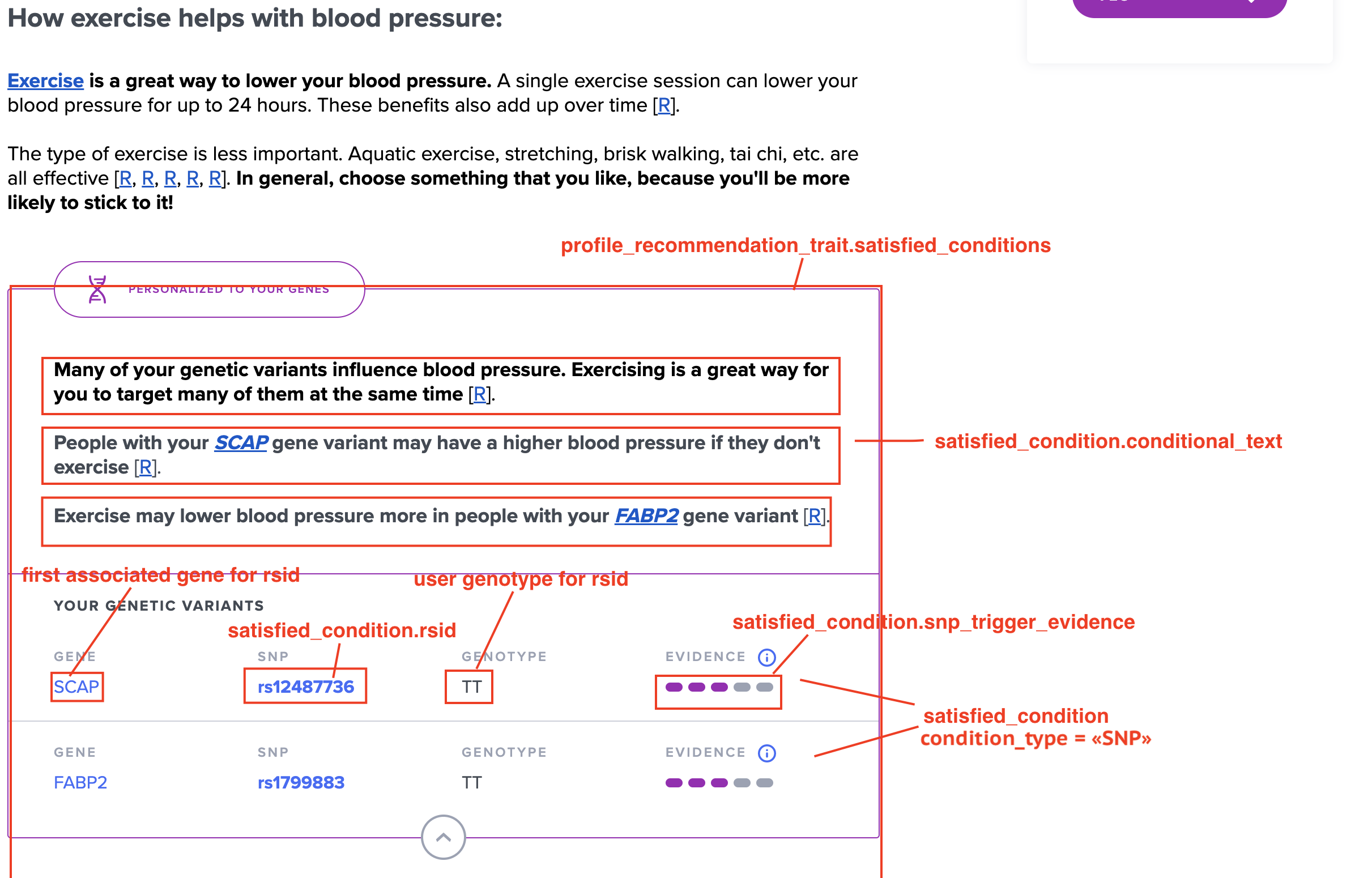
Summary Report (aggregate)
Overview (aggregate)
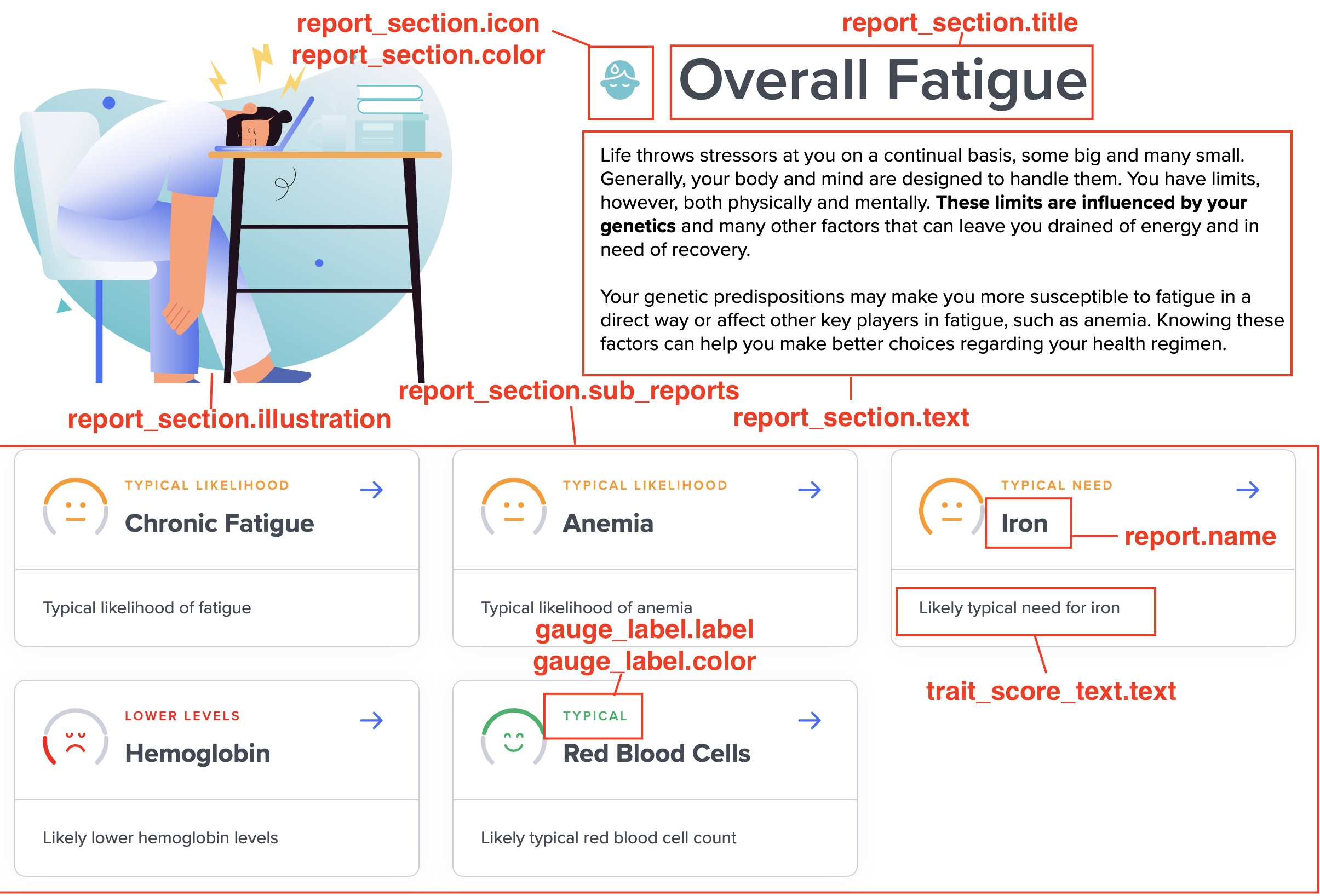
Details (aggregate)
Recommendations (aggregate)
Next Steps (aggregate)
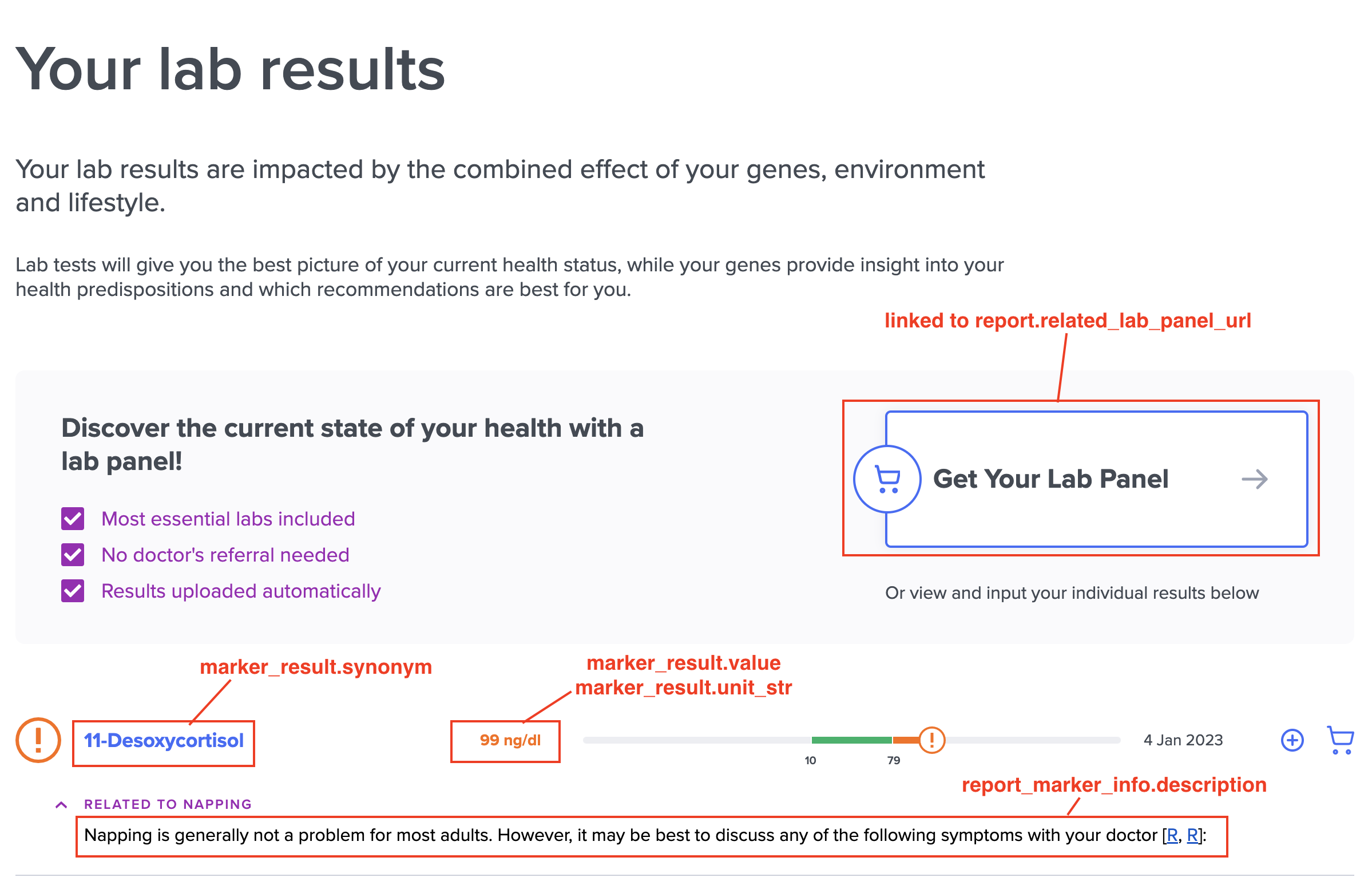
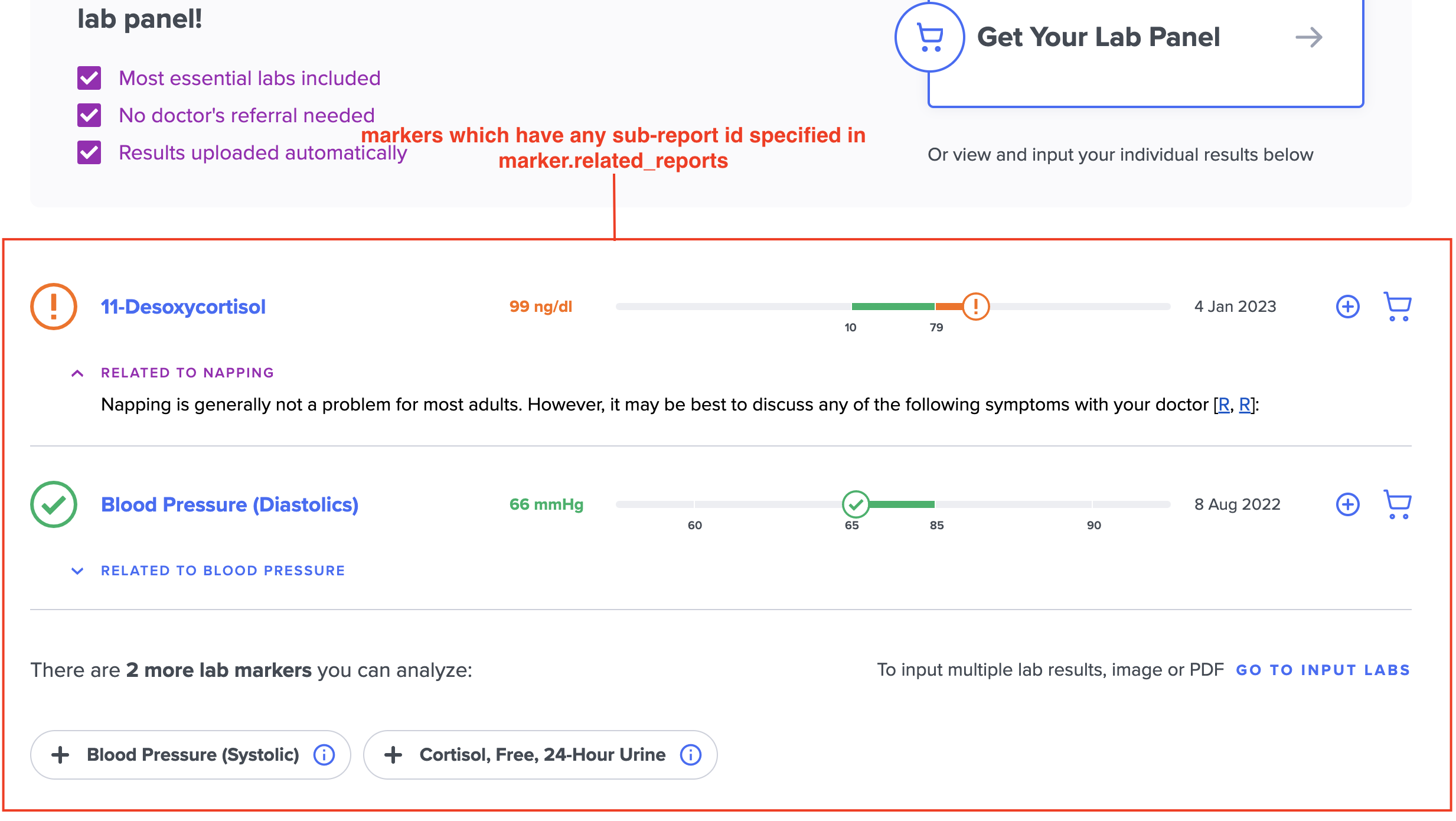
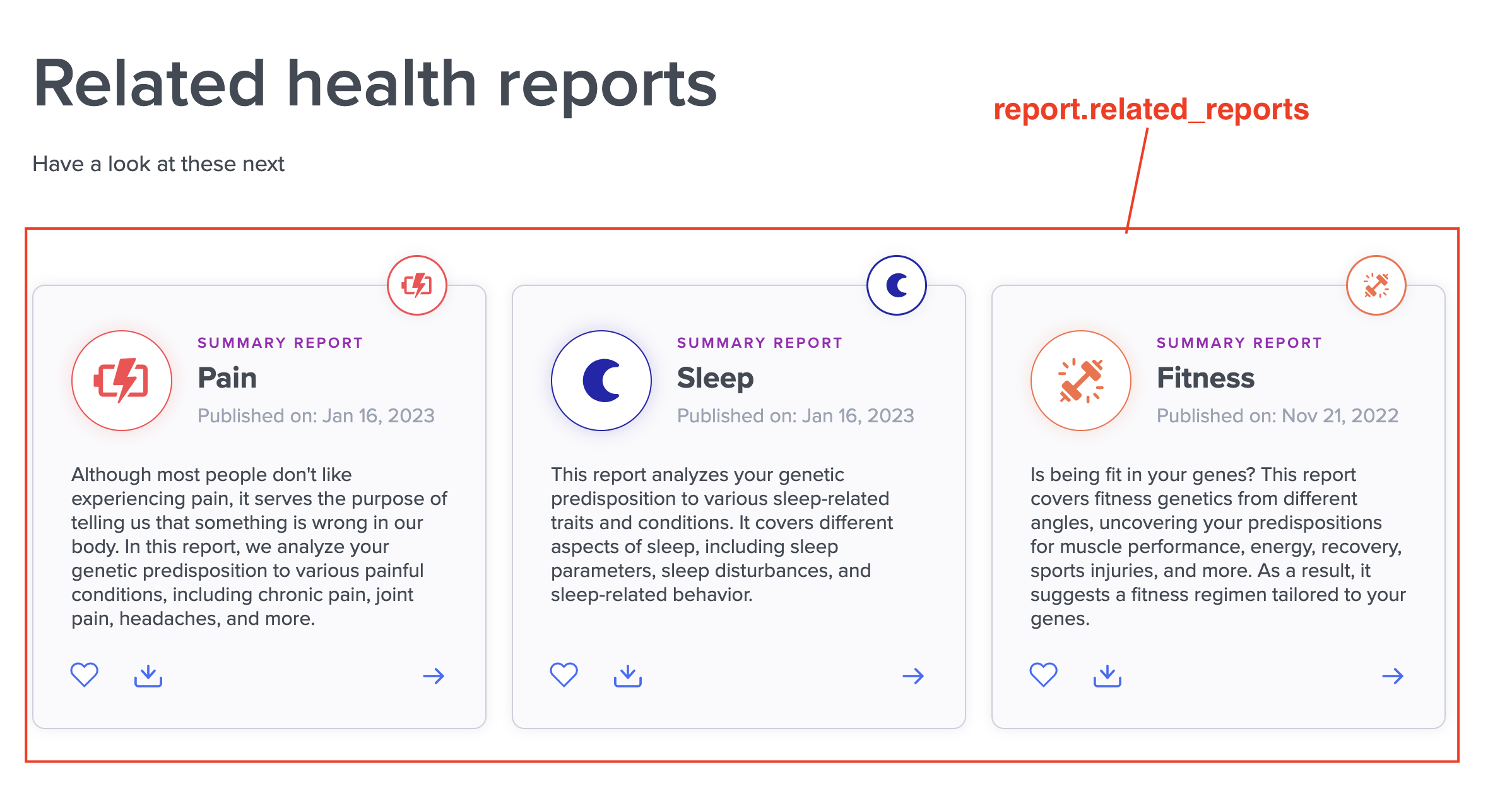
Summary Report (combined)
Overview (combined)
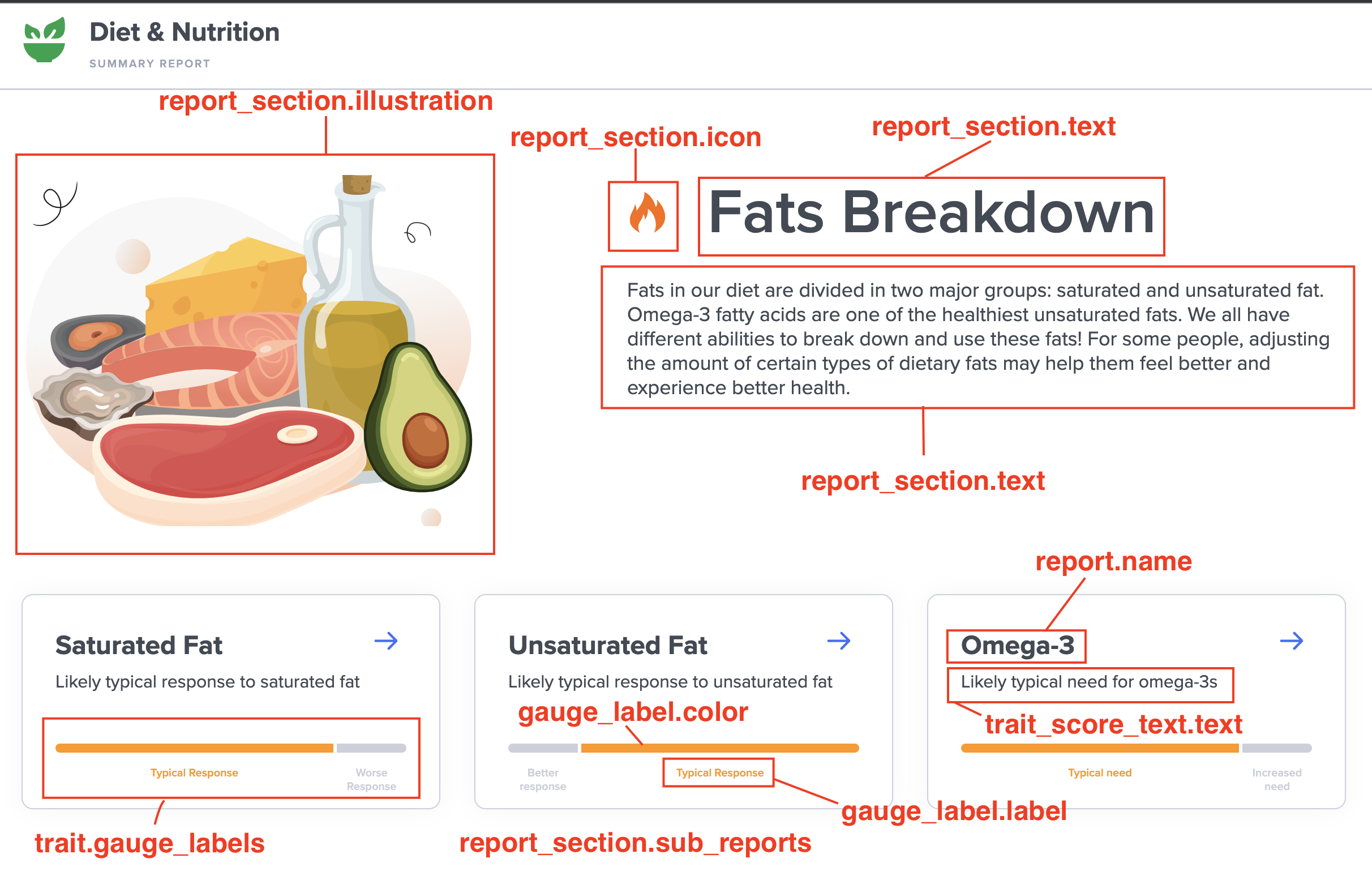
Details (combined)