
Meal Plan Builder access is available as a paid feature. For pricing and activation, please reach out to your manager.
We have a database of over a hundred different healthy and science-backed meals (145 at the time of writing) along with their recipes that are made available over the SD API; consider it a recipe e-book. You can use them to generate a meal plan for your profiles.
Use the GET /meal/ endpoint to list all available meals. For details regarding the query params, including filtering meals by meal category, and details regarding what each field in the response means, refer to the endpoint schema.
Example Response
[
    {
        "id": "0bf177a3-f5ae-46a1-9a97-d95c300931e4",
        "title": "Date and chia pudding",
        "image": "https://selfdecode.com/cdn/media/health-analysis/Date_and_chia_pudding.jpg",
        "categories": [
            "breakfast"
        ],
        "calories": 440,
        "carbs": 0.7,
        "fat": 0.4,
        "protein": 0.4,
        "servings": 1,
        "instructions": "<p>Mix all the ingredients except the dates in a bowl. Quarter the dates and stir them into the mixture until well combined. Cover and chill for at least 4 hours. Stir once or twice to loosen any seeds that may have clumped together. Divide into bowls and top with the blueberries.</p>\r\n\r\n<p><br />\r\n<span style=\"color:#000000\"><strong>Allergens: nuts</strong></span></p>",
        "ingredients": [
            {
                "id": "f6991cc7-b128-4ba3-8913-2f71e3ac78dd",
                "display_text": "2 tsp honey or maple syrup"
            },
            {
                "id": "2a047949-ee17-4597-83bf-259119a1249c",
                "display_text": "1/4 cup blueberries"
            },
            {
                "id": "0524a6af-0797-4760-b23a-fff61ca466ea",
                "display_text": "1 cup almond milk"
            },
            {
                "id": "8fb0c545-f927-4bfa-97a0-d0edf43a43d1",
                "display_text": "1 date"
            },
            {
                "id": "1be913a1-5858-48ac-afa8-a2d8ff36a922",
                "display_text": "1/4 cup chia seeds"
            }
        ],
        "tags": [
            {
                "id": "ce8eb071-c66a-4f99-a0c6-e4a76a877c66",
                "text": "This meal is a source of folate",
                "color": "green",
                "report_id": "460b5d2e-218f-4a57-8037-9711e7f40d09",
                "conditions": [
                    {
                        "id": "f05d745e-3312-4fd5-95ee-fd1324f0f7eb",
                        "effect": 2,
                        "override_text": null,
                        "override_color": null,
                        "outcome_id": "a4dd83da-f4d1-4308-bb75-c9f87ee8b2c4",
                        "answer_option_id": null,
                        "priority": 1
                    },
                    {
                        "id": "3173c6ad-865e-427f-9e40-d98f2b19f854",
                        "effect": 1,
                        "override_text": null,
                        "override_color": null,
                        "outcome_id": "d937ff8e-5205-4a9d-8a0e-4e399f0021a1",
                        "answer_option_id": null,
                        "priority": 1
                    }
                ]
            },
            {
                "id": "777708b8-52bb-4c07-b9eb-d9bf7d9bc142",
                "text": "This meal is a source of calcium",
                "color": "green",
                "report_id": "defe8592-5067-4539-bcf2-b6392fd52ff1",
                "conditions": [
                    {
                        "id": "30193b61-732e-44f4-b255-749a6ef8273f",
                        "effect": 1,
                        "override_text": null,
                        "override_color": null,
                        "outcome_id": "ff50c9cc-69e4-470a-b88c-fe4003e3b851",
                        "answer_option_id": null,
                        "priority": 1
                    }
                ]
            },
            {
                "id": "b3ec7aba-09be-471e-ba1c-b2d22d6246dc",
                "text": "This meal may raise blood sugar",
                "color": "orange",
                "report_id": "34768a99-6e85-4667-a06e-523e8616aea8",
                "conditions": [
                    {
                        "id": "114fdb18-2128-4b27-8078-97b6d0111250",
                        "effect": 2,
                        "override_text": "This meal may contain high-GI foods",
                        "override_color": "orange",
                        "outcome_id": null,
                        "answer_option_id": "bb2d6cba-f996-4ab4-b823-ad7843ad6e2d",
                        "priority": 1
                    },
                    {
                        "id": "a3fb0736-00a8-4ed1-8d31-63992ee02594",
                        "effect": 2,
                        "override_text": "This meal may not be keto-friendly",
                        "override_color": "orange",
                        "outcome_id": null,
                        "answer_option_id": "0ec36402-99e1-4b60-9475-b54c7556e370",
                        "priority": 2
                    },
                    {
                        "id": "9ca97a2a-1552-4b67-8a7f-85b0ed35d4f4",
                        "effect": 1,
                        "override_text": null,
                        "override_color": null,
                        "outcome_id": "a407aa26-c676-4c4c-baa4-ba5e9bad19d1",
                        "answer_option_id": null,
                        "priority": 3
                    },
                    {
                        "id": "f376a4e4-1112-4d72-b6b1-8b4a772899c4",
                        "effect": 1,
                        "override_text": null,
                        "override_color": null,
                        "outcome_id": "8a909311-40ae-4642-9fe3-fd3c77c7bee8",
                        "answer_option_id": null,
                        "priority": 4
                    }
                ]
            }
        ]
    },
    ...
]
Meal Detail Illustration
The fields from the response can be used to generate a meal detail view, as shown in the illustration below:
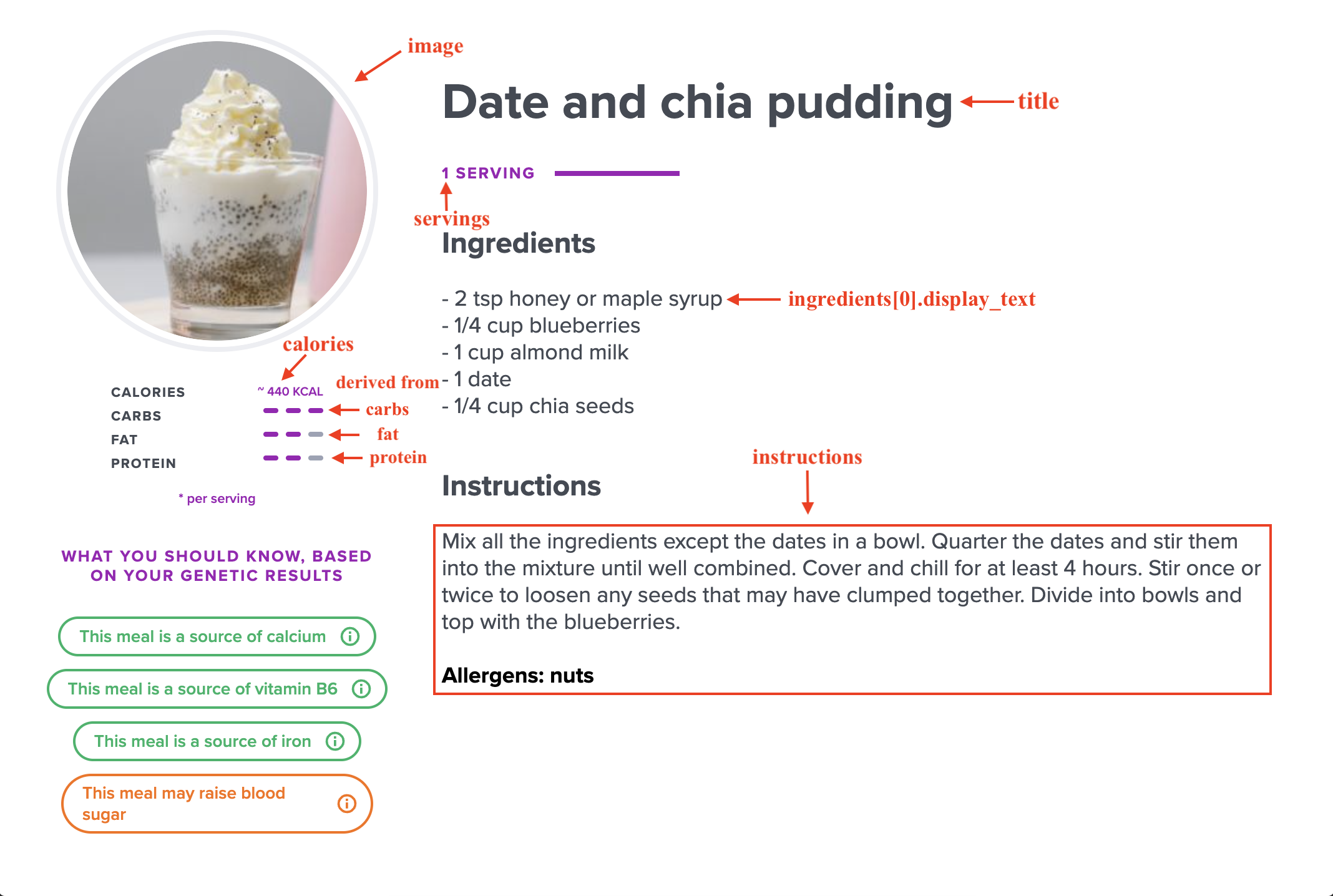
Meal Detail View
Meal tags (optional)
Tags are extra details associated with the meal, which can simply be ignored if not needed.
A single meal can be associated with multiple tags. The list of all tags associated with the meal is returned in the tags field. A tag represents extra information associated with the meal and the relationship between the meal and a genetic report. Hence, each tag is linked with a single report via the report_id field.
The text field contains the information describing an attribute of the meal, while the color denotes whether it is a good attribute (green) or bad (orange). For better understanding, a couple of examples of tags can be as follows:
{
  "id": "3fa85f64-5717-4562-b3fc-2c963f66afa6",
  "text": "Contains Gluten",
  "color": "orange",
  "report_id": "18e86388-1186-4169-8d84-e85e6c1d652b" // id of gluten sensitivity report
}
{
  "id": "3fa85f64-5717-4562-b3fc-2c963f66afa6",
  "text": "Good source of Vitamin A",
  "color": "green",
  "report_id": "e65bd3f7-a3d6-47e6-b37d-9ab4f1c92156" // id of vitamin A report
}
Such tags can be shown in the UI as part of the meal, like in the image below:
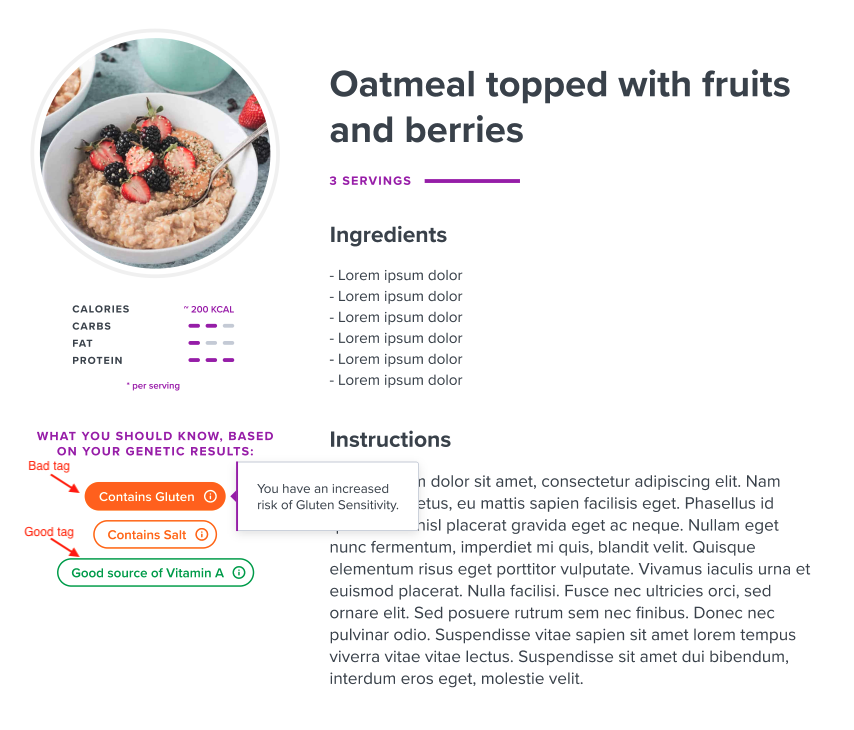
Meal Detail with Tags
Since the gluten tag is linked with Gluten Sensitivity report, we can show the report outcome of the concerned profile if their gluten sensitivity report is generated. For more details regarding report outcomes, please refer here.
Tag conditions (optional)
Each tag can be associated with a set of conditions, which are returned in the conditions field with each tag. Again, you may choose to completely ignore the conditions returned in the response, and just use the tags as per your convenience.
The purpose of tag conditions is to alter meal or tag visibility on the UI based on certain attributes associated with a profile.
There can be two types of conditions returned:
- Genetic report outcome based
outcome_idwould be populated andanswer_option_idwould be null.outcome_idrepresents the outcome of the report that is tied with the tag.
- User feedback response based
answer_option_idwould be populated andoutcome_idwould be null.- These conditions are tied to the diet intake form, which profiles can optionally attempt. Refer here for instructions on how to attempt the diet intake form and list profile answers for the same. The diet intake form covers all questions associated with diet, like food sensitivities, allergies, etc. If a profile finishes the intake form, then these conditions can be used to give users a customised meals experience based on their personalized feedback.
answer_option_idwould be an option ID of one of the questions from the diet intake form, and if the profile has opted for the sameanswer_option_idfor a question in the diet intake form, then this condition would be considered matched. You'd have to traverse through the profile's answers for the diet intake form and see if they have any answer matching theanswer_option_idto determine if the condition matches or not.
At a time, both outcome_id and answer_option_id cannot be populated, but either one of them would always be populated in a condition.
The effect field can have 3 possible values that represents the effect this condition has on the meal and tag visibility when matched.
- 0 - Hide meal (if condition is matched, do not show meal in the UI as part of the optimal diet)
- 1 - Show meal, hide tag (if condition is matched, show the meal, but remove the tag)
- 2 - Show meal, show tag (if condition is matched, show both the meal and the tag - default behaviour)
The override_text and override_color are optional fields associated with the condition that become relevant only when the condition is "2 - Show meal, show tag", because that's the only case when the tag is displayed. The intended purpose of these fields is that if the values of these fields are populated, then as the name suggests, the text and color of the tag is supposed to be overridden with these fields, and if not provided, the default text and color of the tag is supposed be used while displaying the tag.
As mentioned earlier, one tag can have multiple conditions associated with it. To determine the order on which the conditions are supposed to be applied, a priority, which is an integer field, is returned with each condition.
1 is considered higher priority than 2.
Example
Tag
report: Gluten sensitivity
text: "Contains Gluten"
color: orange
1st Condition
priority = 1
effect = Hide meal (0)
answer_option = Sensitive to Gluten
outcome = null
2nd Condition
priority = 2
effect = Show meal, show tag (2)
answer_option = null
outcome = Sensitive to Gluten
3rd Condition
priority = 2
effect = Show meal, hide tag (1)
answer_option = null
outcome = Not Sensitive to Gluten
Case 1
User responded they are sensitive to Gluten in the diet questionnaire.
Intended behaviour: They are not supposed to be shown the meal to begin with, because the first condition will be matched and the meal is intended to be skipped.
Case 2
User responded that they are not sensitive to Gluten, or did not respond to the feedback question. However, their genetic report suggests that they are sensitive to gluten.
Intended behaviour: First condition will not be matched, hence 2nd condition will be visited. The meal would be shown. While displaying the meal, as per the effect in the 2nd condition, the tag would be displayed. Since there is no override_color or override_text field populated, the tag would be displayed with text at tag level: “Contains Gluten” and with color orange.
Case 3
User responded that they are not sensitive to Gluten, or did not respond to the feedback question, and their genetic report suggests that they are not sensitive to gluten.
Intended behaviour: The first and 2nd conditions will not be matched. The meal would be displayed, but the tag will be hidden, because the 3rd condition would be matched.
The endpoint always returns a list of all meals. It is up to the frontend application whether to use these tags and conditions to hide certain meals, or hide / alter certain tags based on these conditions. Hence, these conditions are completely optional.